Product Description
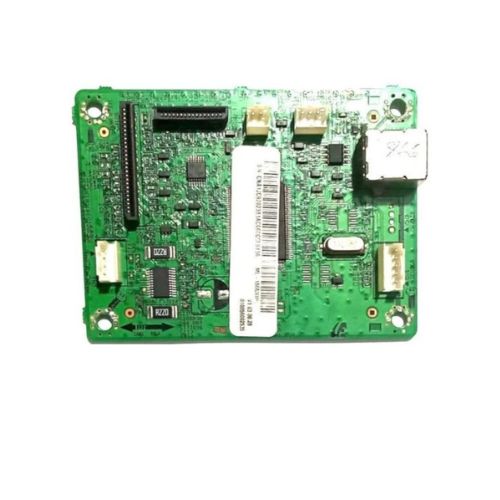
Replace your damaged or faulty logic board with this Formatter Board / Logic Card for Samsung ML-1866 / ML-1860. Designed for precision and performance, this board restores the full functionality of your Samsung monochrome laser printer. Available in Refurbished Original, Pulled Original, and Working Original conditions, each unit is thoroughly tested for reliability.
Compatible Samsung Model:
- Samsung ML-1860/ML1866/ML1860/1866
________________________________________________
Part Numbers :
- (JC92-02381A / JC41-00692A )
________________________________________________
Also Known As:
- Formatter Card / Logic Board / Main PCB Board / Motherboard / MPCA / MLC / USB Board / Main USB Board
________________________________________________
Product Condition:
-
Refurbished Original / Pulled Original / Working Original
-
Professionally cleaned, tested, and fully functional
-
14 Days Replacement Warranty
Reliable Replacement SolutionThe Samsung ML-1866 Logic Card serves as a critical component for your printer, facilitating data processing and efficient workflow. Manufactured with quality assurance, it provides a seamless fit and compatibility, making it the preferred choice for both home and office users when dealing with hardware replacements.
Quality Assurance and DistributionSourced from reputable distributors, suppliers, and traders in India, the logic card is thoroughly tested for performance and durability. Customers can expect genuine parts that meet the manufacturer's standards, ensuring longevity and excellent results.
FAQ's of Samsung ML-1866 Logic Card / Formatter Board:
Q: How do I install the Samsung ML-1866 Logic Card in my printer?
A: To install the logic card, ensure your printer is powered off and unplugged. Follow the service manual for your Samsung ML-1866 printer, remove the old formatter board, and carefully attach the new logic card, securing it with the screws provided. Reconnect any cables and reassemble your printer before powering it back on.
Q: What are the benefits of replacing the Logic Card in my Samsung ML-1866 printer?
A: Replacing a faulty logic card restores communication between the hardware and software, resolving printing errors, improving performance, and extending the life of your printer without the need for costly replacements.
Q: Where should I store the Samsung ML-1866 Logic Card before installation?
A: It is recommended to store the logic card in a cool and dry environment to protect its electronic components from humidity and temperature fluctuations, ensuring long-term functionality and reliability.
Q: When should the logic card be replaced in the Samsung ML-1866 printer?
A: Replace the logic card if your printer consistently fails to process print jobs, displays error codes related to formatting or processing, or if diagnostic tests confirm logic board failure.
Q: What is the process for sourcing a genuine Samsung ML-1866 Formatter Board in India?
A: You can acquire an authentic logic card through authorized distributors, suppliers, and traders specializing in Samsung printer parts across India. It is advisable to check for original packaging and certifications for authenticity.
Q: How is the standard size and color of the logic card advantageous for users?
A: The standard size ensures seamless compatibility with the ML-1866 printer, while the green color helps in easy identification during installation and maintenance, simplifying the replacement process.



 Send Inquiry






 Send Inquiry
 Send Inquiry
 Send SMS


 English
 Spanish
 French
 German
 Italian
 Chinese (Simplified)
 Japanese
 Korean
 Arabic
 Portuguese