Product Description
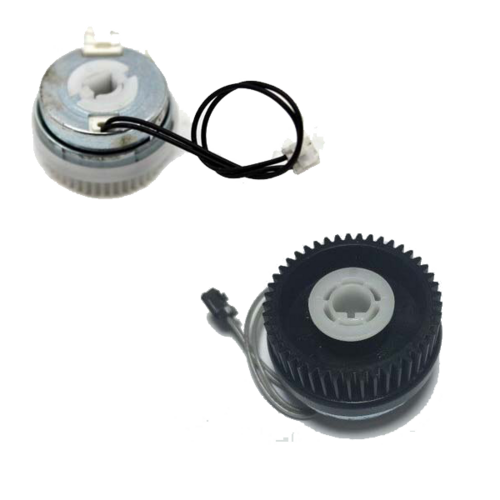
Clutch Relay (Solenoid) For Samsung Xpress SL M2826ND,M2876ND,M2830DW,M2870,M2876FD,M2880FWSamsung Xpress SL M 2826 ND - M 2830 DW - M2870 - M 2876 ND - M 2876 FD - M 2880 FW - 2951 NDSamsung Xpress SL M 2826ND - M 2830DW - M2870 - M 2876ND - M 2876FD - M 2880FW - 2951ND - 2955DW - SCX 4701ND - SCX 4705 - SCX 4728FDSamsung 2826 - 2830 - 2870 - 2876 - 2880 - 2951 - 2955 - 4701 - 4705 - 4728Precision Crafted for Samsung Xpress PrintersThis printer clutch gear is tailored to meet the specific requirements of multiple Samsung Xpress laser models. Engineered with high precision, it guarantees seamless compatibility and efficiency, reducing the risk of printer malfunctions and ensuring smooth operations every time.
Storage and Maintenance RecommendationsFor lasting performance, always store the clutch gear in a dry environment, away from moisture and direct sunlight. Proper storage helps maintain the integrity of the gear, preventing rust or deformation, and extends its usable life for your printer maintenance needs.
Ideal Solution for Distributors, Suppliers, and TradersAvailable for distribution in Angola, this clutch gear provides a reliable supply for maintenance professionals and businesses. With its robust manufacturing and standard sizing, it fits easily and enhances the repair process, ensuring operational consistency for your clients.
FAQ's of Samsung Xpress SL M2826ND M2876ND M2830DW M2870 M2876FD M2880FW Printer Clutch Gear:
Q: How do I install the clutch gear in my Samsung Xpress laser printer?
A: Begin by turning off and unplugging your printer. Then, carefully remove the printer's side panel to access the clutch gear location. Swap the old gear with the new one and securely reassemble all components. Consult your printer's service manual for detailed installation instructions.
Q: What printer models are compatible with this clutch gear?
A: This clutch gear is compatible with Samsung Xpress SL M2826ND, M2876ND, M2830DW, M2870, M2876FD, and M2880FW laser printer models, ensuring versatile use across a variety of devices in the Samsung Xpress range.
Q: When should I replace my printer's clutch gear?
A: Replace the clutch gear if your printer exhibits paper feed problems, unusual noises, or fails to pick up paper reliably. Frequent usage and regular maintenance checks can help determine when a replacement is necessary for optimal printer performance.
Q: Where should I store the clutch gear when not in use?
A: Keep the gear in a dry, clean, and dust-free environment. Avoid humid or damp locations, as moisture may cause rust or damage, and always store it in its original packaging when possible.
Q: What is the benefit of using a precision-manufactured clutch gear?
A: High precision manufacturing guarantees that the clutch gear meshes efficiently with other printer components, promoting smooth paper handling and reducing wear, which results in prolonged printer life and reduced maintenance incidents.
Q: What is the correct process for handling the clutch gear during installation?
A: Handle the gear with clean, dry hands or wear gloves to prevent oils or debris from contaminating the surface. Follow safety precautions by disconnecting the printer from power and refer to the installation guide to avoid damaging components during replacement.




 Accepts only Domestic inquiries
Send Inquiry
Accepts only Domestic inquiries
Send Inquiry



 Send Inquiry
 Send Inquiry
 Send SMS


 English
 Spanish
 French
 German
 Italian
 Chinese (Simplified)
 Japanese
 Korean
 Arabic
 Portuguese