Product Description
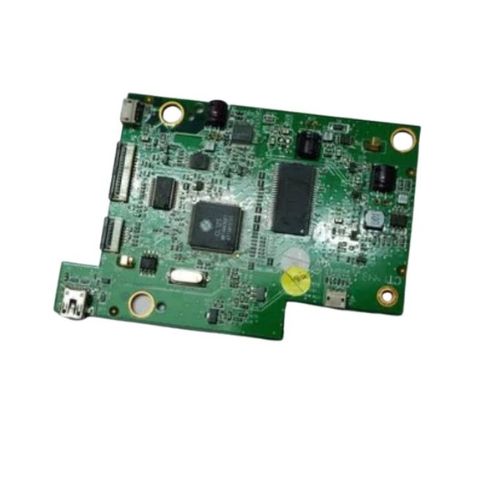
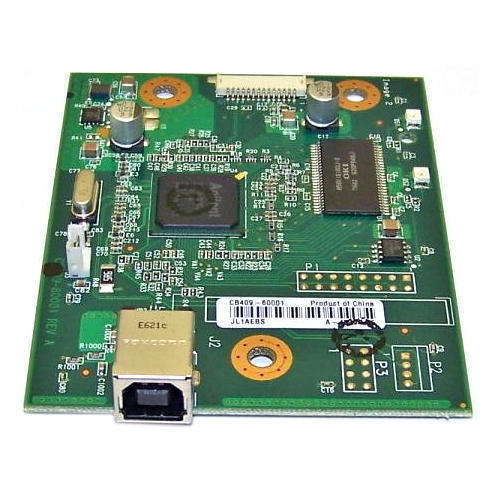
HP Scanjet 200 Flatbed Scanner with this genuine Formatter Board / Logic Card, compatible with the HP Scanjet 200 model.This mainboard acts as the central controller for the scanner, ensuring communication between components and proper image processing. Its the ideal replacement if your scanner is experiencing power-on failures, USB connectivity issues, or logic errors.This product is a Refurbished Original, pulled from working devices and quality-tested to meet performance standards.
Compatible HP Model:
- HP Scanjet 200 Flatbed Scanner
________________________________________________
Also Known As:
- Formatter Card / Logic Board / Main PCB Board / Motherboard / MPCA / MLC / USB Board / Main USB Board
________________________________________________
Product Condition:
-
Refurbished Original / Pulled Original / Working Original
-
Professionally cleaned, tested, and fully functional
-
14 Days Replacement Warranty
Key Component for Enhanced Scanner PerformanceEngineered to meet the technical requirements of the HP Scanjet 200 Flatbed Scanner, this logic card is essential for maintaining the high-quality operation of your device. Its robust construction and official compatibility ensure seamless integration and long-term dependability.
Reliable Distribution Across IndiaAvailable to distributors, suppliers, and traders throughout India, this logic card caters to the maintenance and repair market, ensuring that service providers have access to genuine parts needed for efficient support and replacement services.
FAQ's of HP Scanjet 200 Flatbed Scanner Logic Card:
Q: How do I install the HP Scanjet 200 Flatbed Scanner Logic Card?
A: Installation should be performed by a qualified technician: disconnect the scanner from power, open the casing, replace the existing logic card with the new one, and reassemble. Refer to the scanner's service manual for step-by-step instructions.
Q: What benefits does a new logic card provide for my HP Scanjet 200 Flatbed Scanner?
A: A new logic card restores original scanning performance, addresses hardware connectivity issues, and ensures your scanner runs smoothly, reducing downtime and the need for frequent repairs.
Q: When should I consider replacing the logic card in my scanner?
A: Replace the logic card if your scanner exhibits persistent hardware errors, is unresponsive despite software troubleshooting, or if technical diagnostics recommend hardware replacement.
Q: Where can I purchase the HP Scanjet 200 Flatbed Scanner Logic Card in India?
A: You can source the logic card through authorized distributors, suppliers, and traders specializing in printer and scanner components across India.
Q: What is the proper way to store the logic card before installation?
A: Store the logic card in a cool and dry environment, away from direct sunlight and moisture, to preserve its electronic integrity and prevent damage before installation.
Q: How is the HP Scanjet 200 Logic Card powered?
A: The logic card operates using the electric power supplied by the scanner itself, ensuring stable and continuous operation as long as the scanner remains connected to power.
Q: Is this card compatible only with the HP Scanjet 200 model?
A: Yes, this specific logic card is designed for compatibility with the HP Scanjet 200 Flatbed Scanner. Using it with other models is not recommended due to differences in hardware design.



 Send Inquiry





 Send Inquiry
 Send Inquiry
 Send SMS
 Call Me Free