Product Description
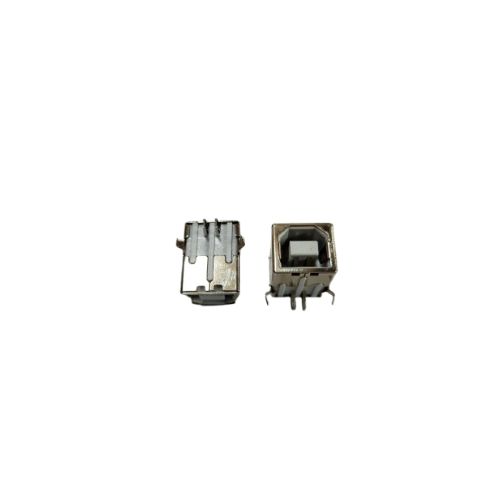
USB Connector 2.0 USB Port For HP / Canon / Samsung / Brother / Ricoh Formatter Card Logic Card (New)
Compatible Model - Hp Laser Jet All Printer Formatter Card All Type
Canon Laser Jet Printer Formatter Card All Type
USB Type B Female Port Connector-USB B 2.0 Female Connector / PCB Type High Quality
Note :- No Replacement - No Warranty-No Guaranty - Non Returnable ltem
Optimal Compatibility Across BrandsThis USB 2.0 connector is compatible with major printer brands, including HP, Canon, Samsung, Brother, and Ricoh, ensuring flexibility for both professional and personal use. Its universal design supports plug-and-play connectivity, simplifying the process for distributors and end-users alike.
Reliable Quality and Solid DesignCrafted for durability, the solid pattern construction and good-quality materials guarantee dependable performance. This connector is specifically engineered for Indian conditions, offering longevity and robust usage for frequent users and traders.
Effortless Storage and Manual PowerWith a manual power source and straightforward storage requirements (dry place), upkeep and usage are stress-free. These simple instructions make handling convenient for suppliers and ensure lasting value for all users.
FAQ's of 2.0 USB Connector For HP / Canon / Samsung / Brother / Ricoh:
Q: How do I connect the 2.0 USB Connector to my printer?
A: Simply insert the USB connector into the corresponding port of your HP, Canon, Samsung, Brother, or Ricoh printer and connect the other end to your computer, ensuring both devices are powered on for successful operation.
Q: What are the main benefits of using this USB connector for printers?
A: This USB connector offers stable data transfer, broad compatibility with leading printer brands, and is made of good-quality, solid materials for reliable, long-term use.
Q: When should I replace my USB connector?
A: Replace your USB connector if you notice intermittent connectivity, physical damage, or degraded performance to ensure consistent and efficient printing operations.
Q: Where should I store the USB connector when not in use?
A: To preserve its quality and performance, store the USB connector in a dry place away from moisture and extreme temperatures.
Q: What is the process for maintaining the connector's performance?
A: Ensure both connectors are clean and dry before use, store in a moisture-free environment, and avoid pulling or bending the cable excessively to maintain peak performance.
Q: How does the manual power source benefit users?
A: A manual power source allows for use without the need for external adapters or power, making this connector convenient and efficient for routine and mobile setups.
Q: What usage tips enhance the life of the USB connector?
A: Handle the connector gently, store it in a dry place, and regularly inspect for dust or debris in the connecting ends to promote durability and consistent operation.



 Send Inquiry





 Send Inquiry
 Send Inquiry
 Send SMS


 English
 Spanish
 French
 German
 Italian
 Chinese (Simplified)
 Japanese
 Korean
 Arabic
 Portuguese