Product Description
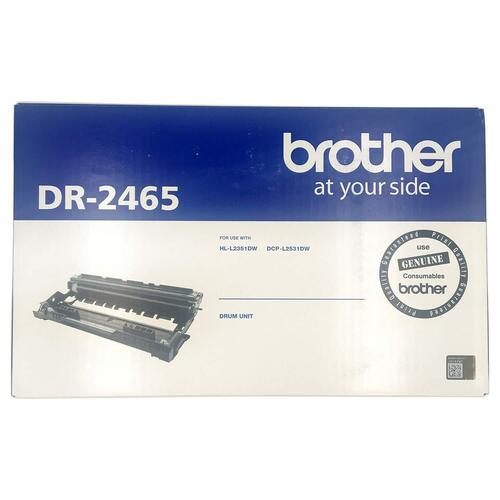
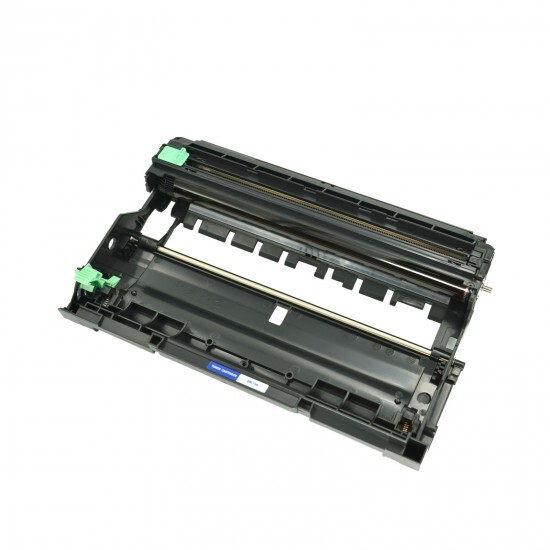
Brother- DR-2465 Drum Unit
Specification
| Model Name/Number | BROTHER DR 2465 Black Orignal Drum Unit |
| Part Type | Cartridge |
| Brand | brother |
| Color | Black |
| Usage/Application | BROTHER DR 2465 Black Orignal Drum Unit |
| Printer Type | Laser Printer |
| Pages Yield | 10000 |
| Chip Description | NA |
| Page Yeild | 10000 |
| Minimum Order Quantity | 10 |
Engineered for Consistent PerformanceThe Brother DR-2465 Drum Unit ensures dependable operation and consistently sharp print quality for laser printing tasks. Each unit is manufactured with the highest standards to meet the demands of busy offices and homes alike, minimizing print interruptions and maximizing the life of your Brother printer.
Simple Installation and CompatibilityDesigned exclusively for Brother laser printers, the DR-2465 drum unit features easy installation for seamless printer maintenance. While compatible with a range of Brother devices, specific model suitability can be verified with your printer manual or through your authorized Brother distributor or supplier.
FAQ's of Brother- DR-2465 Drum Unit:
Q: How do I install the Brother DR-2465 Drum Unit in my laser printer?
A: To install the DR-2465 Drum Unit, first turn off your Brother printer and allow it to cool. Then, open the front cover, remove the used drum unit and toner cartridge, and separate the toner cartridge. Insert the toner cartridge into the new drum unit, and reinstall the assembly into the printer. Always refer to your printer's user manual for detailed, model-specific installation steps.
Q: What maintenance is required for the Brother DR-2465 Drum Unit?
A: The DR-2465 Drum Unit requires minimal maintenance. To ensure optimal print quality, periodically clean the corona wire inside the drum unit following your printer's instructions. Replace the drum when prompted by the printer or if you notice a decline in print quality, such as streaks or faded prints.
Q: When should I replace the DR-2465 Drum Unit?
A: Replace the DR-2465 Drum Unit when your printer displays a drum error message or when printouts begin to show lines, smudges, or faded text and images. Typically, the drum unit has a fixed lifespan, which is outlined in your printer's documentation or by the on-screen prompt during usage.
Q: Where should I store an unused Brother DR-2465 Drum Unit?
A: Store the DR-2465 Drum Unit in a cool, dry location away from direct sunlight. Keeping it in its original packaging until use helps prevent exposure to dust and moisture, ensuring optimal performance and longevity.
Q: What is the benefit of using the Brother DR-2465 Drum Unit with Brother printers?
A: Using the DR-2465 Drum Unit with compatible Brother printers ensures reliable print quality and longevity of both the drum and your printer. This genuine Brother component is engineered for seamless compatibility and maximizes print efficiency while minimizing downtime.
Q: Is the DR-2465 Drum Unit compatible with all Brother laser printers?
A: The DR-2465 Drum Unit is compatible with a selection of Brother laser printers. For exact compatibility, refer to your printer's manual or consult your distributor or supplier to confirm it is suitable for your specific Brother model.
Q: What is the process for purchasing the Brother DR-2465 Drum Unit in India?
A: You can purchase the DR-2465 Drum Unit through authorized distributors, suppliers, or traders of Brother products across India. For assurance of authenticity and warranty, buy only through official or recognized retail channels.



 Send Inquiry





 Send Inquiry
 Send Inquiry
 Send SMS


 English
 Spanish
 French
 German
 Italian
 Chinese (Simplified)
 Japanese
 Korean
 Arabic
 Portuguese