Product Description
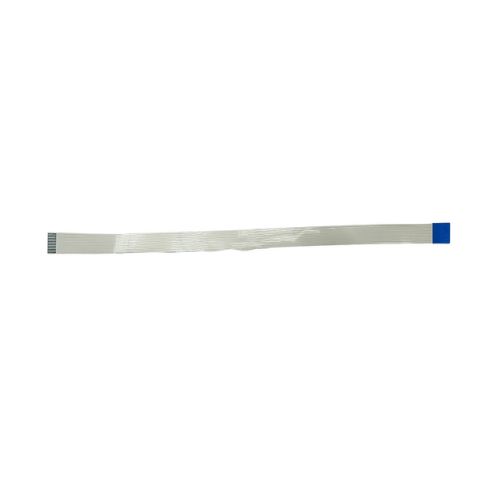
This Wi-Fi Card Cable is designed to restore or upgrade wireless functionality in select Canon ImageCLASS and i-SENSYS printers. Whether you're replacing a damaged cable or setting up a new unit, this cable ensures stable connection between the Wi-Fi module and mainboard, supporting smooth wireless printing.
Compatible Canon Model:
- Canon i-SENSYS MF21.7w/217W/217/MF 217W
- Canon Image Class MF 232W/Canon MF232W/MF232/MF 232W/232
- Canon Image Class MF 229DW/Canon MF229DW/229DW/MF229/229
- Canon Image Class MF 244DW/Canon MF244DW/244DW/MF244/244
- Canon Image CLASS LBP 151dw/LBP151DW/LBP151/151
- Canon Image Class MF 227DW/Canon MF2270W/227DW/MF227/227
- Canon Image Class MF 237W/Canon MF237W/237W/MF237/237
- Canon image CLASS MF 247DW/MF247/MF247DW
- Canon image CLASS MF 249 DW/MF249/MF249DW/249
- Canon 227/229/232/237/244/247/249/151
________________________________________________
Also Known as :
- Wifi Cable - WIFI Card Cable
________________________________________________
Product Condition:
-
Refurbished Original / Pulled Original / Working Original
-
Professionally cleaned, tested, and fully functional
-
No Replacement - No Warranty - No Guaranty Non Returnable Item
Enhance Printer PerformanceUpgrade your Canon printer's connectivity with this high-quality Wi-Fi card cable. Designed specifically for the MF244DW model, it optimizes wireless printing and ensures consistent power delivery. The plain white design complements modern office spaces while offering practical durability.
Easy and Safe InstallationInstalling the cable is simple with the included manual, allowing users-whether distributors, suppliers, or traders-to set up their printers efficiently. Always store the cable in a dry environment to safeguard its performance and increase lifespan.
FAQ's of Canon Image CLASS MF244DW Wi-Fi Card Cable:
Q: How do I install the Canon Image CLASS MF244DW Wi-Fi Card Cable with Power Source?
A: To install, refer to the provided manual, which outlines step-by-step instructions for connecting the cable to your Canon MF244DW printer. Ensure the printer is powered off during installation for safety.
Q: What are the storage recommendations for this Wi-Fi card cable?
A: It is advised to store the cable in a dry place to prevent moisture damage, thereby preserving the cable's quality and ensuring reliable long-term usage.
Q: When should I consider replacing my printer's Wi-Fi card cable?
A: You should replace the cable if you notice connection drops, physical damage, or inconsistent power supply, which can affect your printer's performance.
Q: Where can distributors, suppliers, and traders in India source this cable?
A: This Wi-Fi card cable is available through authorized Canon distributors, suppliers, and traders across India, ensuring easy accessibility for business partners.
Q: What are the main benefits of using this specific Wi-Fi card cable?
A: The cable offers dependable quality, stable wireless connectivity, and robust power supply, leading to enhanced printing efficiency and minimal downtime.
Q: How does this cable improve wireless printing on the MF244DW printer?
A: It ensures a stable and reliable connection by delivering consistent power to the printer's Wi-Fi card, reducing interruptions in wireless printing tasks.



 Send Inquiry





 Send Inquiry
 Send Inquiry
 Send SMS


 English
 Spanish
 French
 German
 Italian
 Chinese (Simplified)
 Japanese
 Korean
 Arabic
 Portuguese