Product Description
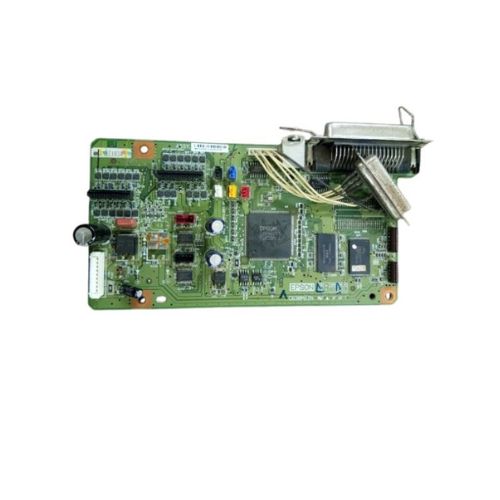
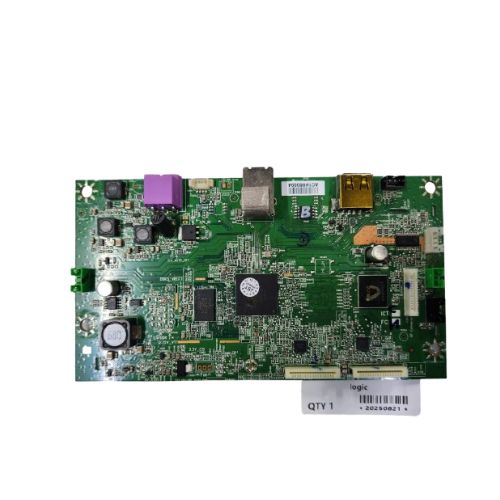
Ensure smooth and uninterrupted printing performance with this genuine Formatter Board / Logic Card for Epson LQ-300+II, one of the most widely used dot matrix printers. Ideal for restoring function in faulty units, this PCB ensures stable communication and efficient printing for all your office or service center needs.Crafted to OEM specifications, this board offers a reliable and cost-effective solution.
Compatible Epson Model:
- Epson LQ300+II / LQ-300 / LQ 300
________________________________________________
Part Numbers :
- (2142964 / 2087340 / 2056311/2015605)
________________________________________________
Also Known As:
- Formatter Card / Logic Board / Main PCB Board /Motherboard / MPCA / MLC / Main USB Board
________________________________________________
Product Condition:
-
Refurbished Original / Pulled Original / Working Original
-
Professionally cleaned, tested, and fully functional
-
14 Days Replacement Warranty
Superior Compatibility and PerformanceDesigned specifically for Epson LQ-300+II printers, this high-quality logic card ensures smooth, uninterrupted printing performance. With its robust construction and solid build, it precisely fits replacement needs and is trusted by distributors and suppliers throughout India.
Easy Installation and MaintenanceFeaturing a manual power source and standardized solid green pattern, the logic card is straightforward to install or replace. This allows technicians and users to efficiently upgrade or repair printers, reducing downtime and ensuring continuous productivity.
FAQ's of Epson LQ-300+II Printer Logic Card / Formatter Board:
Q: How do I install the Epson LQ-300+II Printer Logic Card in my printer?
A: To install the logic card, power off your printer and disconnect it from any power source. Open the printer's casing to access the formatter board slot, carefully insert the new logic card, secure it, and reassemble the printer. Ensure all connections are properly fitted before restoring power.
Q: What benefit does the Epson LQ-300+II logic card offer to printers?
A: This logic card enhances data processing within the printer, ensuring efficient and accurate operation. Its good quality build helps extend the printer's lifespan and minimizes potential technical issues, resulting in reliable printing performance.
Q: When should the formatter board be replaced in an Epson LQ-300+II printer?
A: Replace the formatter board if you experience persistent data errors, failure in processing commands, or after physical damage to the existing logic card. Regular printer malfunctions or frequent error messages also indicate it's time for a replacement.
Q: Where can I purchase the Epson LQ-300+II Logic Card in India?
A: Authorized distributors, suppliers, and traders across India offer this logic card. It is advisable to purchase from trusted sources to ensure you receive a genuine and high-quality component.
Q: What is the process for troubleshooting issues with the logic card?
A: First, check for secure physical connections and any visible damage on the card. Restart the printer and observe any error codes. If issues persist, consult your printer's manual or seek professional technical support for diagnosis and replacement.
Q: How is this logic card beneficial for distributors and suppliers?
A: Distributors and suppliers benefit from the logic card's dependable quality, wide compatibility, and high demand for printer maintenance. Supplying reliable parts helps build trust with clients and secures ongoing business relationships.



 Send Inquiry





 Send Inquiry
 Send Inquiry
 Send SMS


 English
 Spanish
 French
 German
 Italian
 Chinese (Simplified)
 Japanese
 Korean
 Arabic
 Portuguese