Product Description
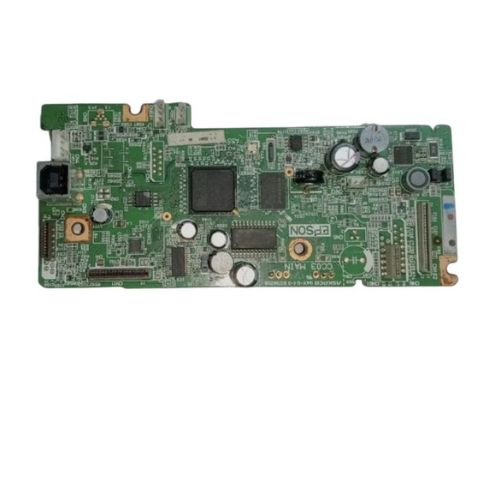
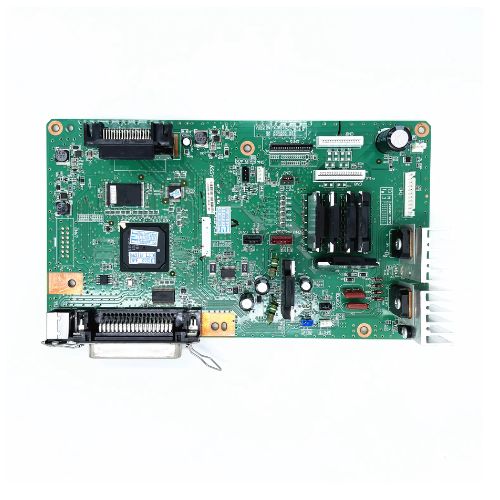
Restore the full functionality of your Epson M205 EcoTank Monochrome InkTank Printer with this high-quality Formatter Board / Logic Card. Engineered for seamless communication between your printer's hardware components, this board ensures efficient printing and connectivity.Perfect for printer servicing, maintenance, or DIY replacements.
Compatible Epson Model:
________________________________________________
Part Numbers :
________________________________________________
Also Known As:
- Formatter Card / Logic Board / Main PCB Board /Motherboard / MPCA / MLC / Main USB Board
________________________________________________
Product Condition:
-
Refurbished Original / Pulled Original / Working Original
-
Professionally cleaned, tested, and fully functional
-
14 Days Replacement Warranty
Enhanced Printer PerformanceUpgrading or replacing your Epson M205 Logic Card can significantly improve your printer's responsiveness and reliability. The solid construction and high-quality materials ensure smooth operation, less downtime, and consistent print results for all your important documents. Choose verified distributors in India for trusted products.
Efficient Maintenance and CompatibilityThis logic card is designed specifically for Epson M205 printers, making installation straightforward. Its manual operation provides you with greater control and ease during maintenance. Follow the recommended storage practices by keeping it in a dry place to extend the card's lifespan and ensure optimal functioning at all times.
FAQ's of Epson M205 Logic Card / Formatter Board:
Q: How do I install the Epson M205 Logic Card in my printer?
A: To install the Epson M205 Logic Card, first power off the printer and disconnect it from the power source. Open the printer's designated logic card compartment, remove the old card if present, and securely insert the new card. Close the compartment, reconnect power, and restart the printer according to your device's manual.
Q: What are the benefits of using a high-quality Epson M205 Formatter Board?
A: A high-quality Epson M205 Formatter Board ensures smooth communication between your printer's hardware and software, resulting in reliable operation and high-quality prints. It also minimizes downtime and helps extend the printer's overall life span.
Q: When should the logic card be replaced in my printer?
A: Replace the logic card if your Epson M205 printer frequently displays hardware errors, experiences communication errors, or is unable to print even after troubleshooting. Replacing the card may resolve persistent technical issues and restore optimal functionality.
Q: Where should I store the Epson M205 Logic Card when not in use?
A: It is recommended to store the Epson M205 Logic Card in a cool, dry place away from moisture, dust, and direct sunlight. Proper storage helps maintain the card's quality and ensures it remains functional until needed.
Q: What is the process for sourcing original M205 Logic Cards in India?
A: To source genuine M205 Logic Cards in India, connect with authorized distributors, suppliers, or traders who specialize in Epson printer components. Always verify the authenticity and compatibility before purchasing for assurance of quality and support.
Q: How can I maximize the lifespan of my Epson M205 logic card?
A: To maximize the card's lifespan, handle it with clean, dry hands, install it correctly, and store any unused cards in a dry, dust-free environment. Regular printer maintenance also contributes to the logic card's durability and performance.



 Send Inquiry





 Send Inquiry
 Send Inquiry
 Send SMS


 English
 Spanish
 French
 German
 Italian
 Chinese (Simplified)
 Japanese
 Korean
 Arabic
 Portuguese