Product Description
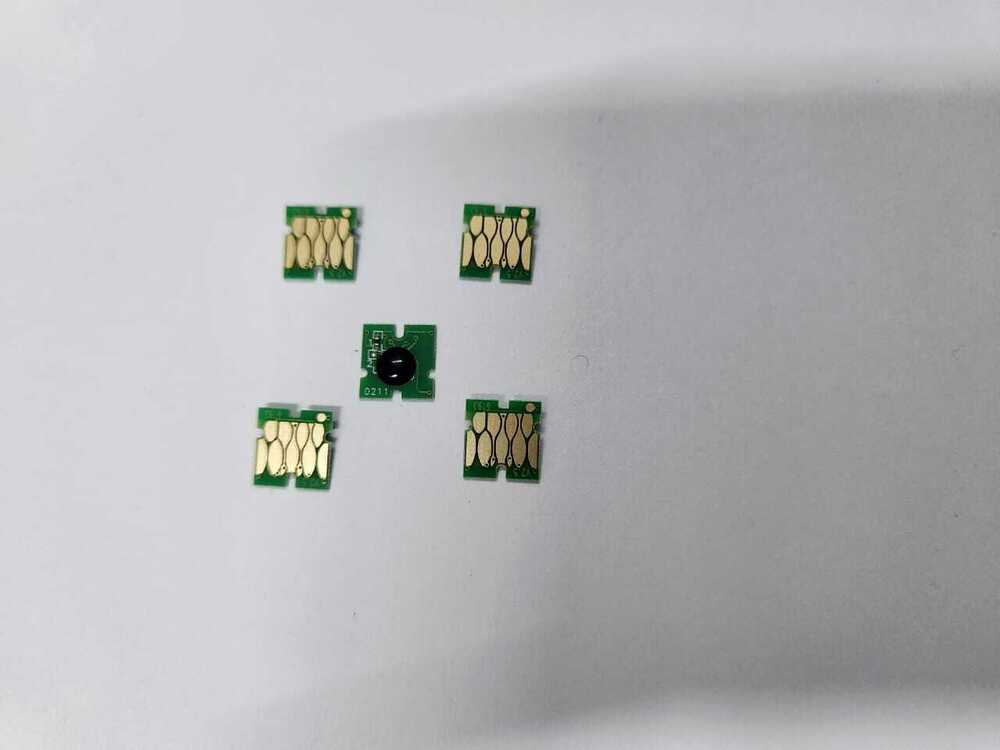
iInk Pad For Epson L210 L110 L310 L360 L130 L313 L363 L220 L111 Printer
Specification
|
Model Name/Number
|
EPSON T-6193 MAINTENANCE BOX CHIP
|
|
Part Type
|
CHIP
|
|
Brand
|
EOSON
|
|
Color
|
GREEN
|
|
Packaging Size
|
23*15*5
|
|
Usage/Application
|
EPSON T-6193 MAINTENANCE BOX CHIP
|
|
Printer Type
|
Inkjet Printer
|
|
Country of Origin
|
Made in India
|
i
Advanced Waste Ink ManagementThe EPSON T-6193 Maintenance Box Chip is meticulously crafted for efficient waste ink tracking in inkjet printers. Its precise chip design ensures reliable communication with your printer, maintaining optimal performance and preventing overflow issues. Users benefit from resettable functionality, extending the maintenance box's usability and cutting recurring costs.
Plug-and-Play ConvenienceInstallation is remarkably simple with its tool-free, slot-in design. The chip is engineered for a seamless user experience-just insert it into the maintenance box and the printer will instantly recognize the chip. This feature means no complicated steps or additional tools are required, making it ideal for both professionals and everyday users.
Quality and Reliability GuaranteedManufactured from high-quality PCBs and built to OEM standards, this chip offers dependable performance and a lengthy operational lifecycle. Each unit is packaged in an anti-static bag to preserve integrity during shipping and storage. Operating efficiently from -10C to 80C, it's suited for various environments while maintaining silent operation.
FAQ's of EPSON T-6193 MAINTENANCE BOX CHIP MAINTENANCE BOX CHIP:
Q: How do I install the EPSON T-6193 Maintenance Box Chip in my printer?
A: Installation is straightforward. Simply insert the chip into the designated slot of the T-6193 maintenance box. It uses a plug-and-play, tool-free design, so no special equipment or technical expertise is necessary.
Q: What is the main benefit of using a resettable maintenance box chip?
A: A resettable chip allows you to reuse the maintenance box after it's full, saving costs and reducing electronic waste. It accurately tracks waste ink levels and can be reset for prolonged maintenance box life.
Q: When should I replace or reset the maintenance box chip?
A: Replace or reset the chip when your printer notifies you that the maintenance box is full or if you're installing a new maintenance box. This ensures proper waste ink management and uninterrupted printing.
Q: Where can the EPSON T-6193 Maintenance Box Chip be used?
A: This chip is specifically designed for Epson inkjet printers that utilize the T-6193 maintenance box. It is fully compatible with original Epson devices requiring this model.
Q: What process is involved in maintaining the chip for optimal performance?
A: Store the chip in a cool, dry place and handle it using anti-static precautions, as each chip is packed in an anti-static bag. Regularly check for printer prompts and reset or replace the chip when needed.
Q: How does the chip benefit distributors and end-users?
A: Distributors benefit from its compatibility with a wide range of Epson printers and easy bulk packaging, while end-users enjoy longevity, high cycle life, and convenient installation, ensuring minimal downtime.



 Send Inquiry





 Send Inquiry
 Send Inquiry
 Send SMS


 English
 Spanish
 French
 German
 Italian
 Chinese (Simplified)
 Japanese
 Korean
 Arabic
 Portuguese