उत्पाद वर्णन
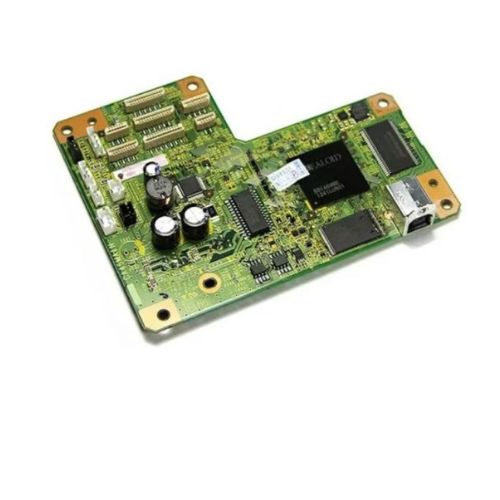
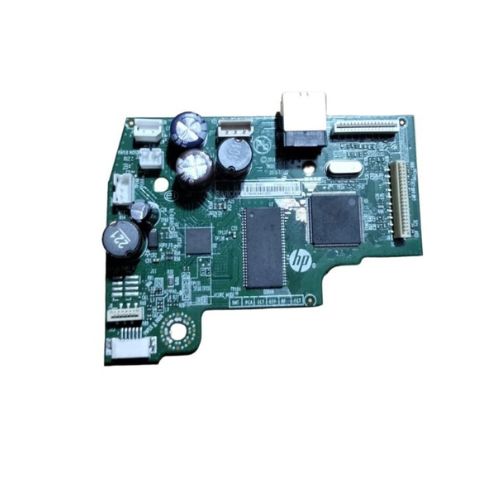
Upgrade or repair your Epson L800 EcoTank Single Function Color Printer with this high-performance Formatter Board / Logic Card. Designed to control the essential functions of your printer, this board ensures reliable and smooth operation for all your printing tasks.Ideal for maintenance professionals and users needing a dependable mainboard replacement.
Compatible Epson Model:
- Epson L 800 Single Function Color Printer
________________________________________________
Part Numbers :
- (2143579 2136551 2154015)
________________________________________________
Also Known As:
- Formatter Card / Logic Board / Main PCB Board /Motherboard / MPCA / MLC / Main USB Board
________________________________________________
Product Condition:
-
Refurbished Original / Pulled Original / Working Original
-
Professionally cleaned, tested, and fully functional
-
14 Days Replacement Warranty
Reliable Performance and CompatibilityThe Epson L800 Eco Tank Logic Card / Formatter Board is tailored to deliver consistent and dependable performance, catering specifically to L800 printers. Its solid pattern ensures stability and precise communication between components, minimizing errors and maximizing productivity.
Quality Assurance and Storage GuidelinesEach Logic Card is rigorously checked to ensure high quality. For best results, users are advised to store the board in a dry place, protecting it from moisture and prolonging its operational life. Following these instructions contributes to continued printer efficiency.
FAQ's of Epson L800 Eco Tank Logic Card / Formatter Board:
Q: How do I install the Epson L800 Eco Tank Logic Card in my printer?
A: To install the Logic Card, carefully follow the instructions provided in the manual. Turn off and unplug the printer, access the formatter board slot, securely fit the logic card, and reassemble the printer. If needed, seek help from a professional or your supplier.
Q: What are the main benefits of using this Logic Card in the Epson L800 printer?
A: The Logic Card ensures stable power delivery and effective processing, resulting in improved printer reliability and print quality. Its good build quality enhances the printer's overall performance and helps prevent technical faults.
Q: When should I consider replacing my printer's Logic Card?
A: You should consider replacing the Logic Card when you encounter persistent communication errors, unexplained malfunctions, or power-related issues in your Epson L800 printer that are not resolved by basic troubleshooting.
Q: Where can I purchase the Epson L800 Eco Tank Logic Card in India?
A: This Logic Card is available through authorized distributors, suppliers, and traders across India. Ensure you purchase from reputable sources to guarantee originality and warranty support.
Q: What is the correct way to store the Logic Card when not in use?
A: Store the Logic Card in a dry and dust-free environment. Avoid exposure to moisture and direct sunlight to maintain its functionality and prevent corrosion or damage.
Q: What is the typical process for replacing the Formatter Board?
A: First, turn off and unplug the printer. Remove the casing as detailed in the manual, carefully detach any connectors, replace the old board with the new one, and reassemble. Always handle with care and follow safety protocols.
Q: How does this product enhance the usage experience of Epson L800 printers?
A: By providing reliable electrical and logical connectivity, the Logic Card ensures smoother operations and consistent print results, leading to enhanced productivity and reduced downtime for users.




 जांच भेजें





 जांच भेजें
 जांच भेजें
 एसएमएस भेजें


 English
 Spanish
 French
 German
 Italian
 Chinese (Simplified)
 Japanese
 Korean
 Arabic
 Portuguese