Product Description
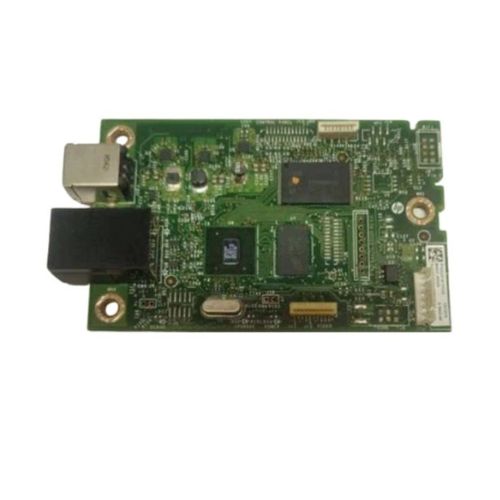
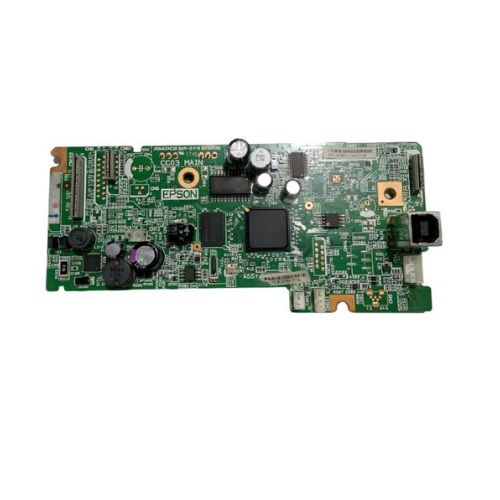
Replace your faulty or non-responsive logic board with this refurbished original formatter board, compatible with HP LaserJet Pro M252dw, M252NW, M252DN, and related models. OEM part numbers B4A22-60001 and B4A21-60002.This Main PCB Board (also referred to as Logic Card, Motherboard, MPCA, or MLC) restores your printer's communication, processing, and USB functions. Ideal for solving power issues, error codes, or USB connectivity failures.
Compatible HP Model:
- HP Laserjet Pro M 252dw / M 252NW / M252DN/ M 252DN / M252
- HP Color LaserJet Pro M252dw / M252DN/ M252N / M252NW / M 252DW/M 252NW/M252N/M252
________________________________________________
Part Numbers :
- (B4A22-60001 / B4A21-60002)
________________________________________________
Product Condition:
-
Refurbished Original / Pulled Original / Working Original
-
Professionally cleaned, tested, and fully functional
-
14 Days Replacement Warranty
Enhance Printer EfficiencyUpgrade your HP Laserjet Pro M252dw with this genuine logic card to ensure smooth and high-quality printing. The card is optimized for standard operations, helping your printer handle A4 documents seamlessly. Get improved reliability and minimize downtime with this essential replacement part.
Dedicated CompatibilitySpecifically crafted for the HP Laserjet Pro M252dw model, this logic card is fully compatible with HP printers. The standard size and recommended green color make installation easy for distributors and service engineers across India. Rely on consistent performance without compatibility concerns.
Proper Storage and UsageTo preserve the card's longevity, store it in a cool and dry environment. The card operates on electric power and is built to withstand regular usage demands. Follow manufacturer guidelines for installation and handling to maintain printer efficiency and maximize the logic card's service life.
FAQ's of HP Laserjet Pro M252dw Logic Card:
Q: How do I install the HP Laserjet Pro M252dw Logic Card in my printer?
A: To install the logic card, turn off and unplug your HP Laserjet Pro M252dw. Open the printer casing as per the model instructions, carefully insert the logic card into the designated slot, and secure it. Once installed, close the casing and reconnect the power supply before turning the printer on.
Q: What are the benefits of using this specific logic card in my HP printer?
A: Using the HP Laserjet Pro M252dw Logic Card ensures compatibility, stability, and optimized functionality. It helps maintain high-quality print output while reducing the risk of hardware malfunctions, thereby prolonging your printer's operational lifespan.
Q: When should I consider replacing the logic card in my printer?
A: Consider replacing the logic card if your printer frequently displays error messages, fails to print properly, or after a diagnosis indicating hardware issues. Regular maintenance and timely replacement help avoid unnecessary downtime.
Q: Where can I purchase the HP Laserjet Pro M252dw Logic Card in India?
A: This logic card is available through authorized distributors, suppliers, and traders specializing in HP printer components across India. Ensure you purchase from a trusted source for genuine and warranty-backed parts.
Q: What is the recommended way to store the logic card before installation?
A: Store the logic card in a cool, dry place away from direct sunlight and moisture to prevent damage. Follow the manufacturer's storage guidelines to maintain its performance and reliability until installation.
Q: How does the logic card support standard printing processes for A4 paper size?
A: The logic card is engineered for standard operation with A4 paper size, ensuring reliable data processing and smooth communication between printer components for seamless color printing.
Q: What power source is required for the HP Laserjet Pro M252dw Logic Card?
A: The logic card is designed to operate on an electric power source, drawing power through the printer's internal supply when installed and the printer is turned on.



 Send Inquiry





 Send Inquiry
 Send Inquiry
 Send SMS


 English
 Spanish
 French
 German
 Italian
 Chinese (Simplified)
 Japanese
 Korean
 Arabic
 Portuguese