Product Description
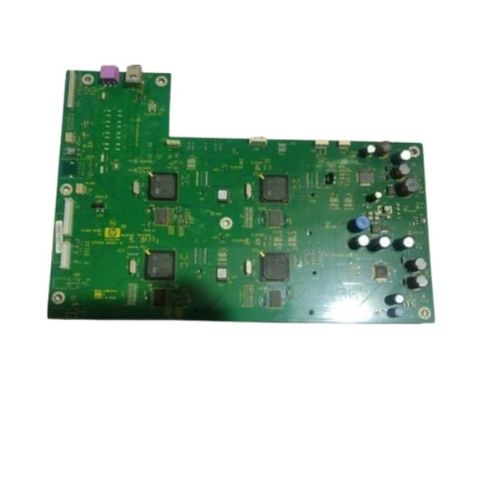
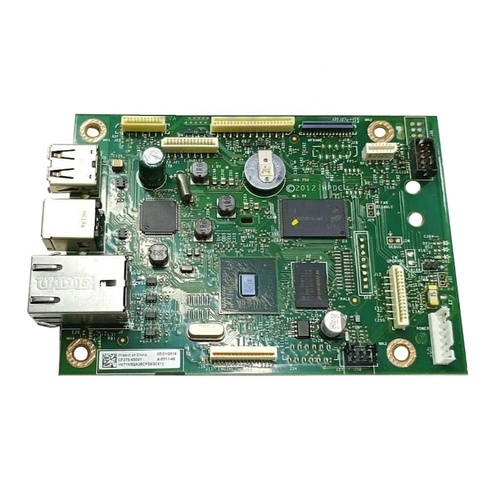
HP Scanjet Enterprise Flow 7500 Flatbed Scanner (L2725A) to optimal functionality with this genuine Formatter Board / Logic Card. Serving as the device's main controller, this component is critical for managing scanner operations, connectivity, and data flow.This board is a refurbished original, pulled from working devices, and thoroughly tested to ensure full functionality. Whether you're fixing startup issues, USB connection failures, or logic errors, this formatter board is your reliable solution.
Compatible HP Model:
- HP Scanjet Enterprise Flow 7500 Flatbed Scanner
- HP 7500 Scanner / HP Scanjet 7500
________________________________________________
Part Numbers :
- (L2725A / Q7405-60001 / Q7405-80001)
________________________________________________
Also Known As:
- Formatter Card / Logic Board / Main PCB Board / Motherboard / MPCA / MLC / USB Board / Main USB Board
________________________________________________
Product Condition:
-
Refurbished Original / Pulled Original / Working Original
-
Professionally cleaned, tested, and fully functional
-
14 Days Replacement Warranty
Enhanced Scanner PerformanceUpgrade or restore your HP Scanjet Enterprise Flow 7500 scanner with this high-quality logic card. Designed to ensure swift processing and clear document output, this genuine replacement part helps maintain consistent productivity in high-demand office environments. Dependability is guaranteed when you rely on original, compatible HP hardware.
Reliable Supply Across IndiaAvailable through authorized distributors, suppliers, and traders, the HP Scanjet Enterprise Flow 7500 Logic Card can be sourced throughout India. Its availability ensures uninterrupted workflow for businesses nationwide, backed by trustworthy customer support and efficient delivery services.
FAQ's of HP Scanjet Enterprise Flow 7500 Logic Card:
Q: How do I install the HP Scanjet Enterprise Flow 7500 Logic Card in my scanner?
A: Installation of the logic card should be performed by a qualified technician or service professional to ensure safety and proper setup. Consult your device manual or authorized service center for step-by-step installation guidelines.
Q: What is the recommended storage method for the logic card when not in use?
A: For best results, store the HP Scanjet Enterprise Flow 7500 Logic Card in a cool and dry place to prevent moisture or heat damage, ensuring optimal longevity and performance when installed.
Q: When should I consider replacing the logic card in my HP Scanjet 7500?
A: Consider replacing the logic card if your scanner experiences persistent errors, reduced performance, or fails to power on, as these can be signs of a faulty or damaged card.
Q: Where can I purchase the HP Scanjet Enterprise Flow 7500 Logic Card in India?
A: This logic card is available through authorized distributors, suppliers, and traders across India. Purchasing from official channels ensures compatibility and warranty support.
Q: What benefits does using a compatible HP logic card provide for my scanner?
A: Using a compatible HP logic card maintains scanner performance, reduces downtime, and preserves device reliability, providing consistent scanning quality for professional environments.
Q: How does this logic card impact the scanning process?
A: The logic card processes scanned data, ensuring fast and accurate document digitization. Its efficiency contributes directly to smoother operation and clearer output from your HP Scanjet 7500.



 Send Inquiry





 Send Inquiry
 Send Inquiry
 Send SMS


 English
 Spanish
 French
 German
 Italian
 Chinese (Simplified)
 Japanese
 Korean
 Arabic
 Portuguese