Product Description
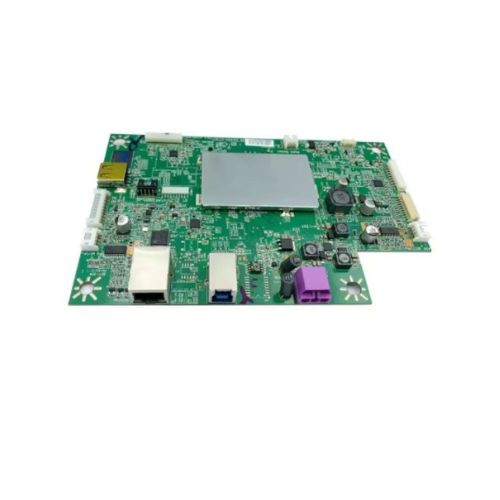
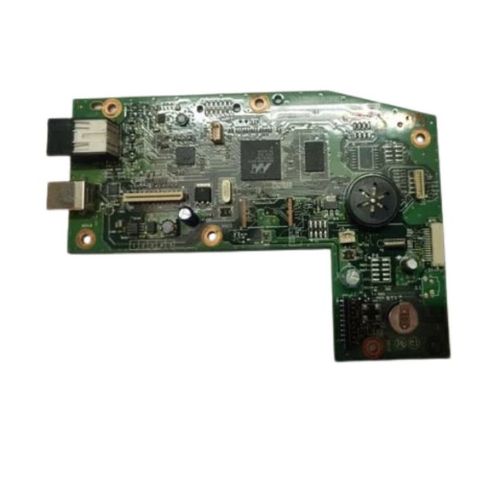
HP ScanJet Pro 4500 FN1 Network Scanner with this high-quality Formatter Board / Logic Card. This crucial internal part controls the main functions of your scanner including data processing and USB/network communication.Ideal for repair engineers and businesses seeking reliable spare parts for HP scanning equipment. Professionally refurbished and tested for performance and compatibility.
Compatible HP Model:
- HP ScanJet Pro 4500 FN1 Network Scanner
- Hp 4500 FN1 Scanner
________________________________________________
Also Known As:
- Formatter Card / Logic Board / Main PCB Board / Motherboard / MPCA / MLC / USB Board / Main USB Board
________________________________________________
Product Condition:
-
Refurbished Original / Pulled Original / Working Original
-
Professionally cleaned, tested, and fully functional
-
14 Days Replacement Warranty
Reliable Performance for Your PrinterThe HP Scanjet Pro 4500 FN1 Logic Card is designed for seamless integration with your scanner and printer, ensuring stable and efficient operation every time. Its durable, solid-pattern construction guarantees longevity, while the green color helps with easy identification during installation and repairs. Trust this essential part to maintain high performance.
Easy Installation and MaintenanceThis formatter board is designed with manual installation in mind, making maintenance straightforward for technicians and users familiar with printer repairs. Detailed instructions provided by your distributor or supplier in India make replacing your logic card quick and hassle-free. Store it in a dry place to keep it in top condition until needed.
Distributed by Trusted Indian PartnersThe HP Scanjet Pro 4500 FN1 Logic Card is distributed, supplied, and traded by reliable partners throughout India, ensuring fast delivery and genuine product sourcing. Indian distributors prioritize quality and customer support, assisting with all your HP printer part needs.
FAQ's of HP Scanjet Pro 4500 FN1 Logic Card / Formatter Board:
Q: How do I install the HP Scanjet Pro 4500 FN1 Logic Card in my printer?
A: To install the HP Scanjet Pro 4500 FN1 Logic Card, first switch off your printer and unplug it. Open the printer enclosure, locate the old logic card for replacement, and manually install the new board into the designated slot. Re-secure any covers and reconnect the printer to power. Follow any additional steps provided in your product manual.
Q: What is the main benefit of using this formatter board in my printer?
A: The main benefit of the HP Scanjet Pro 4500 FN1 Logic Card lies in its ability to process print commands efficiently, ensuring smooth and reliable printer performance. Its high build quality minimizes downtime and optimizes print output quality.
Q: Where should I store the formatter board before installation?
A: It is recommended to store the HP Scanjet Pro 4500 FN1 Logic Card in a dry place, away from moisture, direct sunlight, and dust. Proper storage helps preserve its quality and reduces the risk of damage until it is ready for use.
Q: When should I consider replacing my existing logic card?
A: You should consider replacing your current logic card if your printer begins to exhibit errors in processing print commands, experiences frequent crashes, or displays issues not resolved by software updates. A new formatter board can restore optimal functionality.
Q: What is the process for sourcing this product in India?
A: To source the HP Scanjet Pro 4500 FN1 Logic Card in India, you can contact authorized distributors, suppliers, or traders who specialize in HP printer parts. Ensure you purchase from trusted partners for genuine, high-quality components.
Q: How does the solid pattern and green color benefit users?
A: The solid pattern provides a robust structure, increasing the durability of the logic card. The green color assists technicians by making the board easily identifiable within the printer, simplifying installation and maintenance processes.



 Send Inquiry





 Send Inquiry
 Send Inquiry
 Send SMS


 English
 Spanish
 French
 German
 Italian
 Chinese (Simplified)
 Japanese
 Korean
 Arabic
 Portuguese