Product Description
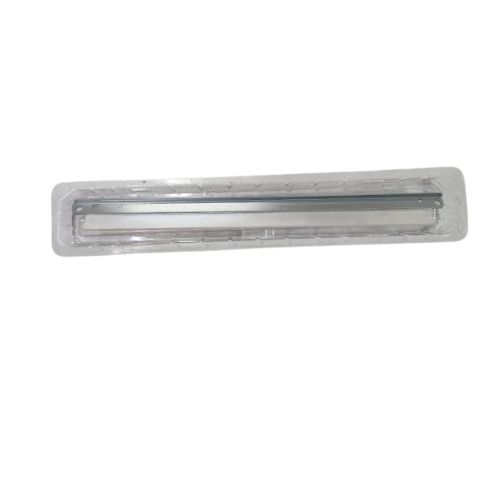
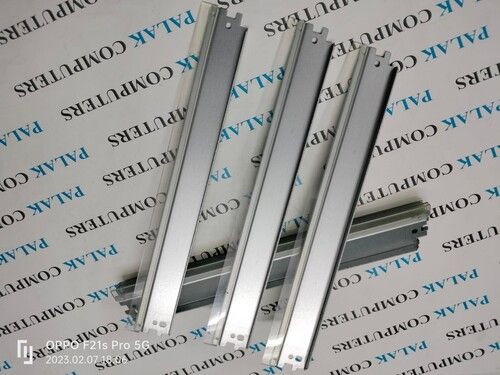
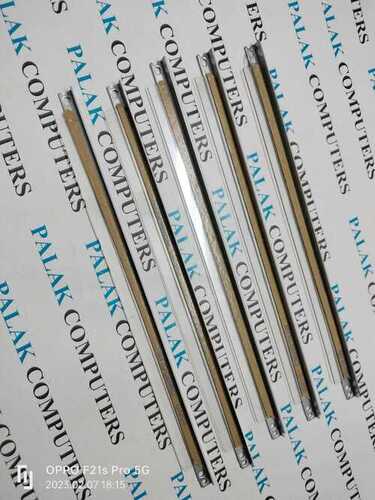
Cleaning Blade Drum Cleaning Blade Wiper blade for KYOCERA M2040 DK1150 for TK1178 | TK1168 | TK1158 P2235dn 2235dw M2040dn M2540dn, M2640idw
KYOCERA Ecosys M2540DN KYOCERA M2540
KYOCERA Ecosys M2640IDM KYOCERA M2640
KYOCERA Ecosys M2040dn KYOCERA M2040
DK-1150 DK 1150 DK1150/DK-1158 DK 1158 DK1158 DV-1158
KYOCERA Ecosys M2040d/KYOCERA Ecosys M2135dn/KYOCERA Ecosys M2635dn/KYOCERA Ecosys M2635dw/KYOCERA Ecosys M2540dn/ KYOCERA Ecosys M2540dw/KYOCERA Ecosys M2640idw/KYOCERA Ecosys M2735dw/KYOCERA Ecosys P2235dn/KYOCERA Ecosys P2235dw/ KYOCERA Ecosys P2040dn/KYOCERA Ecosys P2040dw/P2040 -P2235 M2735 M2640 M2540/M2635 M2135 M2040
Solid and Reliable Drum Cleaning SolutionThe KYOCERA M2040 DK1150 Drum Cleaning Blade with a solid pattern ensures efficient removal of toner residue, helping maintain the integrity and performance of your printer's drum. Its high-quality build and compatibility with KYOCERA M2040 printers make it an indispensable component for regular printer upkeep. This product is widely distributed in India for ease of access.
Proper Storage and Quality AssuranceTo maximize the longevity of the DK1150 Drum Cleaning Blade, it should be stored in a dry place. Manufactured with stringent quality controls, this cleaning blade meets the requirements of high use environments, ensuring dependable results every time and supporting smooth printing operations.
FAQ's of KYOCERA M2040 DK1150 for TK1178 Drum Cleaning Blade:
Q: How do I install the KYOCERA M2040 DK1150 Drum Cleaning Blade in my printer?
A: To install the DK1150 Drum Cleaning Blade, power off your KYOCERA M2040 printer, open the printer drum unit, and carefully remove the old cleaning blade. Replace it with the new blade, ensuring it is securely in place, and reassemble the unit. Always refer to your printer's manual for detailed, model-specific instructions.
Q: What is the primary benefit of using the DK1150 Drum Cleaning Blade in my KYOCERA M2040 printer?
A: The main benefit of the DK1150 Drum Cleaning Blade is its ability to effectively clean drum surfaces, preventing toner buildup and ensuring consistent, high-quality prints. This reduces maintenance issues and prolongs the lifespan of your printer's components.
Q: When should I replace the drum cleaning blade in my KYOCERA M2040 printer?
A: You should replace the drum cleaning blade whenever you notice print quality deterioration, streaks, or after reaching the recommended maintenance cycle specified by KYOCERA. Regular replacement helps maintain optimal printer performance.
Q: Where should I store the DK1150 Drum Cleaning Blade before installation?
A: Store the DK1150 Drum Cleaning Blade in a dry place, away from moisture, direct sunlight, and extreme temperatures. Proper storage prevents damage to the blade and helps maintain its cleaning efficiency.
Q: What process should I follow for the safe disposal of the used drum cleaning blade?
A: To dispose of the used drum cleaning blade safely, remove it from your printer using gloves, avoiding toner contact. Place the blade in a sealed bag or container and follow local electronic waste disposal guidelines or consult with your supplier for recommended disposal methods.
Q: Can the DK1150 Drum Cleaning Blade be used in printers other than the KYOCERA M2040?
A: The DK1150 Drum Cleaning Blade is specifically designed for the KYOCERA M2040 model. Using it in other models is not recommended, as compatibility and performance are not guaranteed.




 Accepts only Domestic inquiries
Send Inquiry
Accepts only Domestic inquiries
Send Inquiry



 Send Inquiry
 Send Inquiry
 Send SMS


 English
 Spanish
 French
 German
 Italian
 Chinese (Simplified)
 Japanese
 Korean
 Arabic
 Portuguese