Product Description
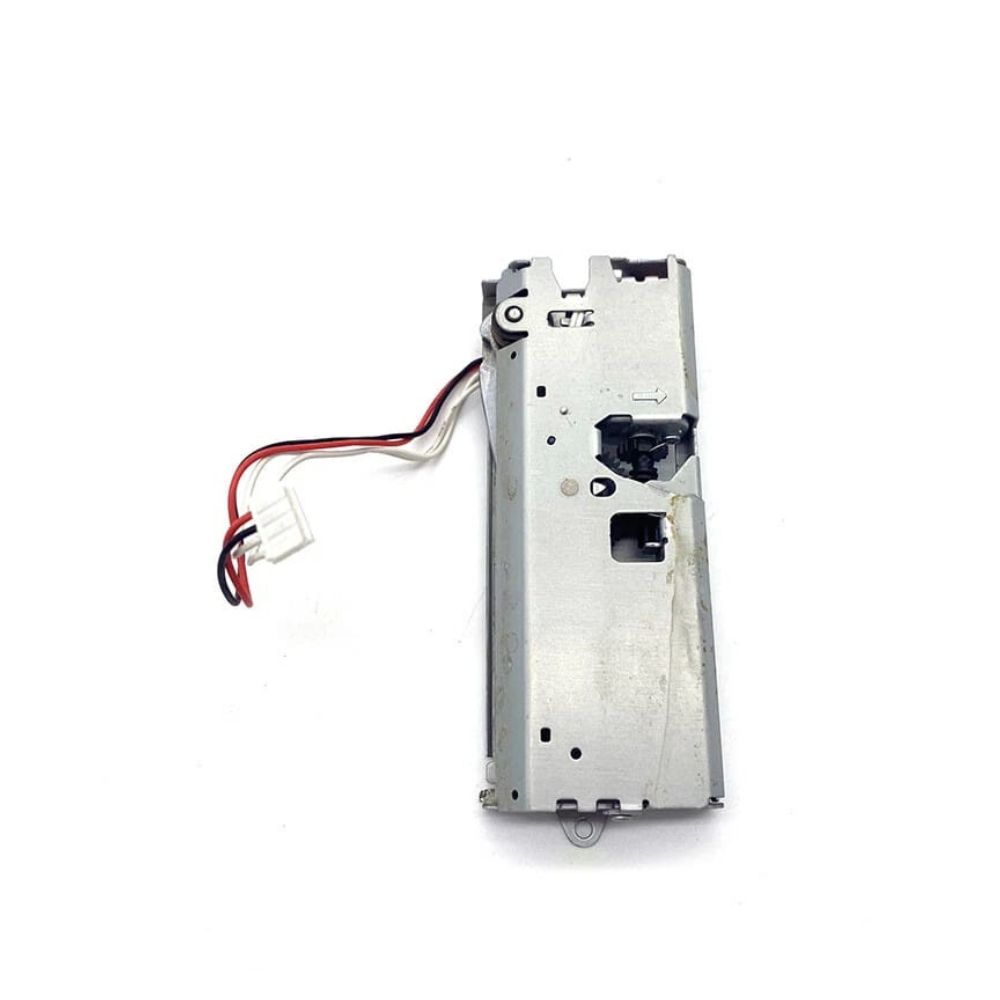
PAPER CUTTER AUTO CUTTER FOR EPSON TM-T82 Thermal Receipt Printer (1691807, 1562622)
Epson t82/ TM-T82/ M249B/ tm-t82/ TM-T60/ T60/
tmt82/ tmt-82/ tmt-81/ tmt81/ tmt-82II/TM-T8211/ TMT-8211
: CUTTER/ AUTO CUTTER/ PRINTER PAPER CUTTER/ PAPER CUTTER
Enhance Efficiency with Auto Cutting TechnologyUpgrade your EPSON TM-T82 Thermal Receipt Printer with this silver Auto Cutter. Engineered for seamless integration, it automates the receipt cutting process and reduces manual workload. Perfect for busy retailers and businesses across India, this accessory supports smooth, continuous operations and helps maintain a tidy transaction area. Store in a cool, dry place to maximize longevity.
Reliable Design for Professional ResultsConstructed with quality materials, this auto cutter provides fast and precise paper cutting. Its electric power source guarantees consistent performance even during peak hours. The standard size fits your EPSON TM-T82 printer easily and retains full functionality over extended use. Installation and maintenance are straightforward, making it a practical addition to your point-of-sale system.
FAQ's of PAPER CUTTER AUTO CUTTER FOR EPSON TM-T82 Thermal Receipt Printer:
Q: How do I install the auto cutter on my EPSON TM-T82 Thermal Receipt Printer?
A: To install the auto cutter, first ensure the printer is powered off and unplugged. Carefully attach the cutter to the designated slot on your EPSON TM-T82, following the manufacturer's installation manual. Ensure all connections are secure before powering the printer back on.
Q: What benefits does the auto cutter provide for receipt printing?
A: The auto cutter streamlines receipt management by automatically cutting receipts after each print, resulting in clean, even edges. This feature saves time, increases transaction speed, and enhances the overall professional appearance of your receipts.
Q: When should I replace the auto cutter in my thermal printer?
A: Replacement is suggested if you notice irregular cuts, incomplete separation, or if the cutter exhibits wear that affects performance. Regular maintenance and proper storage can extend the cutter's lifespan, but heavy use environments might require more frequent replacements.
Q: Where should I store the auto cutter when not in use?
A: Always store the auto cutter in a cool and dry place to prevent damage from moisture and heat. Proper storage helps maintain the integrity of its components and ensures reliable performance when reinstalled.
Q: What is the process for maintaining the auto cutter to ensure optimal function?
A: Regularly check the cutting blade for debris or paper residue and gently clean with a soft, dry cloth. Avoid contact with liquids and harsh chemicals. Routine inspection and maintenance help sustain optimal cutting quality and extend the device's service life.
Q: Can the auto cutter be used with any printer model other than the EPSON TM-T82?
A: This auto cutter is specifically designed for the EPSON TM-T82 Thermal Receipt Printer. Using it with other printer models is not recommended as compatibility or proper function cannot be guaranteed.
Q: How does using an auto cutter improve business operations?
A: An auto cutter increases efficiency by reducing manual intervention, minimizing queue times, and providing customers with neat, professional receipts. This results in smoother workflows and an improved customer experience.



 Send Inquiry





 Send Inquiry
 Send Inquiry
 Send SMS


 English
 Spanish
 French
 German
 Italian
 Chinese (Simplified)
 Japanese
 Korean
 Arabic
 Portuguese