Product Description
HP Ink Tank Wireless 410/ 415 / 416 / 419/ HP Ink Tank 410 - 415 - 416 419
HP Smart Tank 500 All-in-One series - HP Smart Tank 510 Wireless All-in-One series
HP Smart Tank 516 Wireless All-in-One series- HP Smart Tank 530 Wireless All-in-One HP Smart Tank 610 Wireless All-in-One series- HP Smart Tank Plus 550 Wireless All-in- HP Smart Tank Plus 570 Wireless All-in-One series-HP Smart Tank Plus 650 Wireless HP Smart Tank Wireless 450 series- HP Ink Tank Premium 615- 1TJ09A
HP Ink Tank Premium 655 -1TJ11A - HP Smart Tank 500 All-in-One - 4SR29A
HP Smart Tank 500 All-in-One -4SR30A - HP Smart Tank 510- 3YW73A
HP Smart Tank 510-4SB23A - HP Smart Tank 516 Wireless All-in-One Pr-3YW70A
HP Smart Tank 530 Wireless Al-in-One - 4SB24A - HP Smart Tank 530 Wireless All-in-One- 4SB25A
HP Smart Tank 530 Wireless All-in-One - 5NZ74A - HP Smart Tank 610 Printer- YOF73A
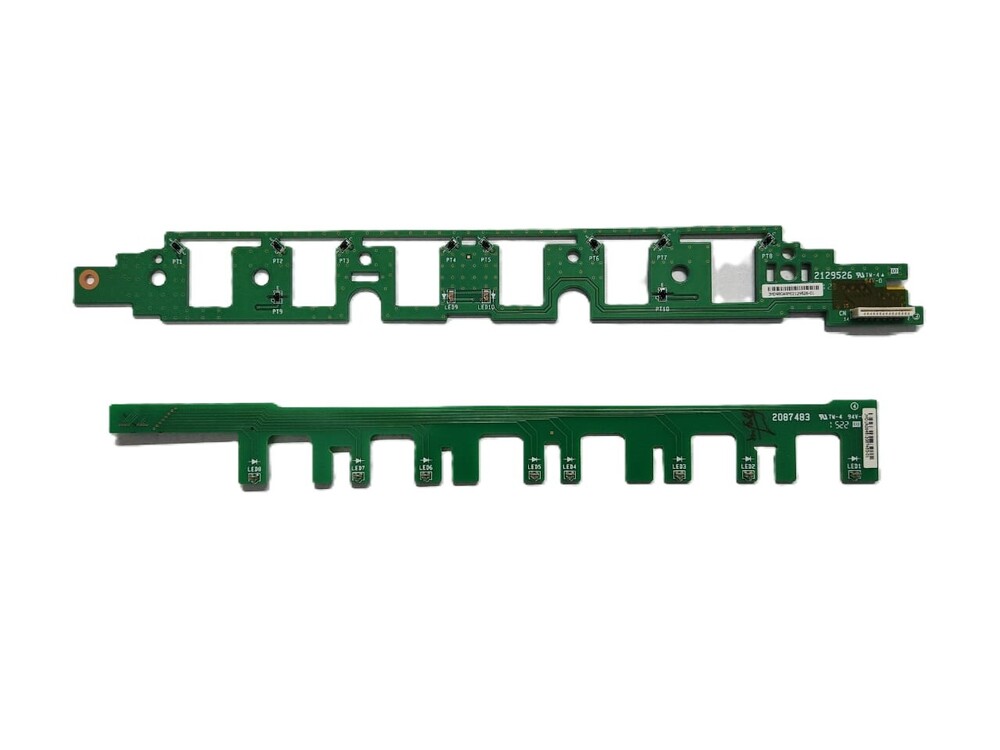
Paper Sensor / Paper Feeding Sensor/ PCA Label Circuit
High-Precision Paper DetectionThe sensor PCB employs advanced engineering to provide reliable and accurate paper detection in HP Smart Tank printers. Its performance ensures smoother printing cycles by minimizing paper jams and misfeeds, maintaining the integrity of every print job, regardless of paper size.
Easy Installation and OEM CompatibilityDesigned with a standard PCB layout and optimum dimensions, this paper sensor PCB integrates effortlessly into your designated HP printer models. Its OEM compatibility guarantees reliable operation, and its plug-and-play connectivity means minimal downtime during replacement or setup.
Built for Durability and SafetyConstructed using a lead-free solder finish, this PCB is engineered for long-lasting performance. The circuit board's robust build and silent operation ensure consistent paper sensing, while simple storage instructions ensure it remains in optimal condition until use.
FAQ's of Paper Sensor PCB For HP Smart Tank 515 / 516/ 530 / 419:
Q: How do I install the Paper Sensor PCB in my HP Smart Tank printer?
A: Installation is simple: open your printer's designated maintenance access area, locate the original paper sensor PCB, disconnect its connection, and replace it with the new PCB by aligning and connecting it to the printer's PCB port. Always ensure the printer is switched off during installation.
Q: What HP printer models are compatible with this Paper Sensor PCB?
A: This sensor PCB is compatible with HP Smart Tank 515, 516, 530, and 419 ink tank printers. It is designed specifically to fit and function properly with these models, ensuring OEM-level performance.
Q: When should I consider replacing the paper sensor PCB in my printer?
A: Consider replacing the paper sensor PCB if you notice consistent paper detection errors, false paper jam alerts, or if the existing sensor is physically damaged. Replacing the PCB restores reliable paper handling.
Q: Where should I store the Paper Sensor PCB before installation?
A: Store the sensor PCB in a cool, dry place, away from dust and static charges. Proper storage ensures the component remains functional and undamaged until it is needed.
Q: What benefits does this paper sensor PCB provide for my printer?
A: The sensor PCB offers high precision in detecting various paper sizes, reduces paper jam incidents, and contributes to smooth, uninterrupted printing. It also operates silently and increases the overall reliability of your printer.
Q: Is this paper sensor PCB difficult to connect to the printer?
A: No, installation is straightforward due to its standard PCB layout and connector. It is a plug-and-play component compatible with the internal power supply of the printer.


 Send Inquiry





 Send Inquiry
 Send Inquiry
 Send SMS


 English
 Spanish
 French
 German
 Italian
 Chinese (Simplified)
 Japanese
 Korean
 Arabic
 Portuguese