Product Description
Printhead For
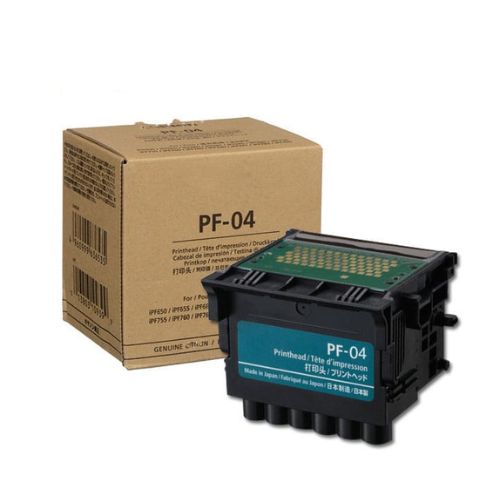
Canon PF-04 Printhead
iPF650/iPF655 / iPF680/iPF681/iPF685/ iPF686/ iPF750 iPF755 / iPF760 / iPF765/ iPF780/ iPF781 / iPF785 / iPF786
Compatible with Canon iPF650 iPF655 iPF670 iPF671 iPF680 iPF681 iPF685 iPF686 iPF750 iPF755 iPF760 iPF765 iPF770 iPF771 iPF780
Canon Printhead PF-04
imagePROGRAF iPF650
imagePROGRAF iPF655
imagePROGRAF iPF670
imagePROGRAF iPF755
imagePROGRAF iPF680
imagePROGRAF iPF685
imagePROGRAF iPF750
imagePROGRAF iPF760
imagePROGRAF iPF765
imagePROGRAF iPF770
imagePROGRAF iPF780
imagePROGRAF iPF785
Enhanced Printing PrecisionThe Canon PF-04 Printhead is meticulously crafted for printers to deliver high-resolution prints. Whether producing technical documents or vivid posters, it guarantees reliable output and superior detail for all your projects. Compatible with various Canon models, it's a trusted choice for businesses and professionals seeking consistent, top-quality printing.
Easy Installation and CompatibilityThis printhead is specifically designed for simple installation into Canon iPF650, iPF655, iPF680, iPF681, and iPF685 printers. Its tailored fit ensures that replacements are straightforward, minimizing downtime. With a universal electric power source and plain pattern design, it integrates seamlessly into your workflow.
FAQ's of Print Head For Canon PF-04 Printhead iPF650/iPF655 / iPF680/iPF681/iPF685:
Q: How do I install the Canon PF-04 Printhead in my compatible printer?
A: To install the Canon PF-04 Printhead, turn off and unplug your printer first. Open the top cover, carefully unpack the printhead, and align it with the cartridge holder. Gently secure it in place, then close the top cover. Plug in and power on your printer to complete setup.
Q: What printers are compatible with the Canon PF-04 Printhead?
A: The Canon PF-04 Printhead is compatible with Canon iPF650, iPF655, iPF680, iPF681, and iPF685 printers, ensuring broad utility across multiple models commonly used in professional environments.
Q: When should I replace the printhead on my printer?
A: Replacement is recommended when print quality declines, such as streaks or missing colors, or if you receive a printhead error message from your printer. Regular checks help you maintain optimal performance.
Q: Where should I store the Canon PF-04 Printhead when not in use?
A: Store the printhead in a cool, dry place, away from direct sunlight and humidity, as this helps to preserve its integrity and prevent potential damage before installation.
Q: What is the process for maintaining the printhead after installation?
A: Regularly run your printer's cleaning cycles and use only recommended inks. Avoid touching the nozzle area and operate your printer periodically to prevent clogging of the printhead.
Q: How does using this printhead benefit my printer's performance?
A: The Canon PF-04 Printhead delivers crisp lines, vibrant color accuracy, and consistent results, which enhances your printer's output. Its reliable performance also minimizes maintenance issues and downtime.



 Send Inquiry





 Send Inquiry
 Send Inquiry
 Send SMS


 English
 Spanish
 French
 German
 Italian
 Chinese (Simplified)
 Japanese
 Korean
 Arabic
 Portuguese