Product Description
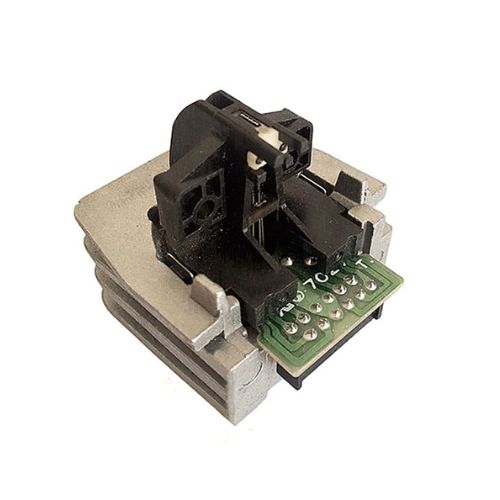
Print Head For TVS MSP 445 Star / MSP 450 / MSP 355 / MSP 345 / MSP 455XL Dot Matrix Printer
Compatible Model -TVS MSP345 Star-MSP355- MSP445 Star -MSP455 Star
TVS MSP 345 Star / MSP 355 / MSP 450 CHAMPION/ MSP 455
Engineered for Compatibility and ReliabilityThis print head is specifically designed for TVS dot matrix printers, including models MSP 445 Star, MSP 450, MSP 355, MSP 345, and MSP 455XL. Its construction ensures easy installation and consistent, high-quality printing, making it an excellent choice for offices and businesses requiring reliable document output.
Durable Design with Simple MaintenanceBuilt to endure extended use, this silver print head maintains its efficiency over time. Proper storage in a cool, dry environment and routine cleaning will maximize its lifespan, enabling uninterrupted performance for your TVS printers in a variety of settings.
FAQ's of Print Head For TVS MSP 445 Star / MSP 450 / MSP 355 / MSP 345 / MSP 455XL:
Q: How do I install the print head in my TVS dot matrix printer?
A: To install the print head, first turn off and unplug your printer. Open the printer cover, gently release the old print head, and align the new print head with the designated slot. Secure it in place and close the cover before powering on the machine.
Q: What benefits does the Print Head for TVS MSP models offer?
A: This print head ensures sharp and clear print quality, reliable performance, and compatibility with several TVS printer models. Its durable construction lowers the frequency of replacements, reducing costs and minimizing downtime.
Q: When should I consider replacing the print head in my TVS printer?
A: Replace the print head if you notice faded or incomplete prints even after changing the ribbon, or if physical damage is visible. Regularly monitoring print quality helps determine when a replacement is needed to maintain optimal results.
Q: Where should I store the print head when not in use?
A: Store the print head in a cool, dry environment to prevent moisture and dust accumulation. Keeping it in its original packaging helps protect it from damage and ensures longevity.
Q: What is the recommended process for cleaning the print head?
A: Turn off the printer and allow the print head to cool. Use a soft, lint-free cloth lightly moistened with isopropyl alcohol to gently wipe the print head, removing dust and accumulated ink residues. Let it dry thoroughly before reinstalling.
Q: Is the print head compatible with all TVS printer models?
A: This print head is specifically compatible with TVS MSP 445 Star, MSP 450, MSP 355, MSP 345, and MSP 455XL dot matrix printers. Check your printer model to ensure compatibility before purchasing.


 Send Inquiry





 Send Inquiry
 Send Inquiry
 Send SMS
 Call Me Free


 English
 Spanish
 French
 German
 Italian
 Chinese (Simplified)
 Japanese
 Korean
 Arabic
 Portuguese