Product Description
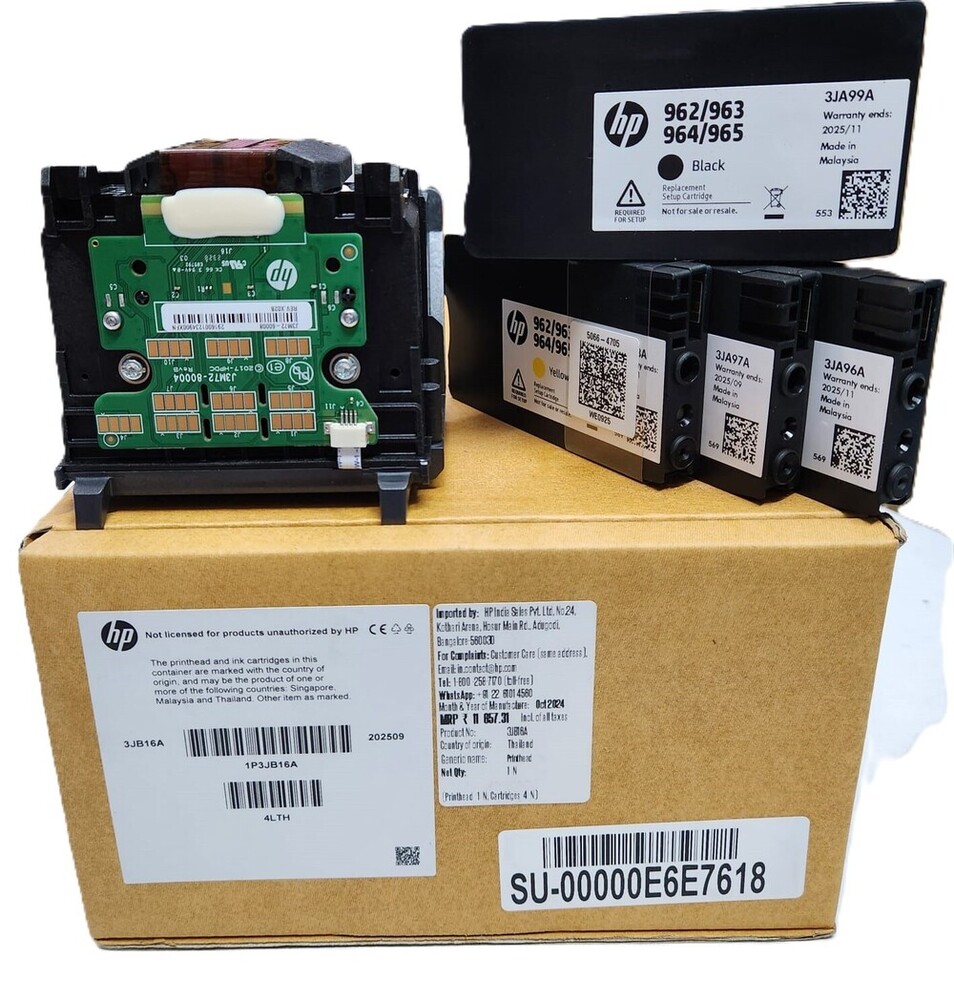
Print Head HP 962 963 964 965 For HP Officejet Pro
9010 9012 9014 9015 9016 9018 9019 9020 9022 9025 9026 9027 9028 9029 Printhead (ORIGINAL)
For Use In (ORIGINAL)
Print Head HP 962 963 964 965 For HP Officejet Pro
9010 9012 9014 9015 9016 9018 9019 9020 9022 9025 9026 9027 9028 9029 Printhead (ORIGINAL)
Print Head Replacement 962 963 964 965 for HP 9010 9012 9014 9015 9016 9018 9019 9020 9022 Printer
962 963 964 965 Print Head for HP 9010 9012 9014 9015 9016 9018 9019 9020 9022
3JB16A 962/963/964/965
HP Officejet Pro 9010, 9012, 9015, 901 9010 9018 9019 9020 9028 9029 962 963 964 9010 9012 9014 9015 9016 9018 9019 9020 9022 9025 9026 9027 9028 9029 Printhead
: PRINT HEAD / HEAD PRINTHEAD/ PRINTER HEAD /INKJET PRINT HEAD
Seamless Compatibility and PerformanceEngineered for HP Officejet Pro models, this print head guarantees smooth operation and high-resolution output. The integrated design and tool-free installation make maintenance straightforward for both home and office users.
Advanced Technology and DurabilityWith a thermal inkjet mechanism and OEM specifications, the print head ensures lasting performance and minimal downtime. The high nozzle count enables precise, vivid color and sharp text across a range of paper sizes, including A4 and Letter.
Easy Maintenance and StorageThe print head's tool-free, snap fit installation process simplifies replacement. For optimal performance, store the unit in a cool, dry place within the recommended temperature and humidity ranges, ensuring reliable results for up to two years.
FAQ's of Printer Print Head HP 962 963 964 965 For HP Officejet Pro:
Q: How do I install the HP 962/963/964/965 Print Head in my HP Officejet Pro printer?
A: Installation is quick and tool-free. Simply unlock and remove the old print head, then align and snap the new unit securely into place following your printer's manual guidelines.
Q: What HP Officejet Pro printer models are compatible with this print head?
A: This print head is manufactured for HP Officejet Pro 9010, 9012, 9013, 9014, 9015, 9016, 9018, 9020, 9022, and 9025 Series printers.
Q: When should I replace the print head for optimal results?
A: For best performance, replace the print head if you notice faded prints, frequent errors, or reach the 24-month service life, whichever comes first.
Q: Where should I store the print head when not in use?
A: Store in a cool, dry place with temperatures between 15C - 35C and humidity levels from 10% to 80% RH to maintain longevity and printing quality.
Q: What is the expected benefit of using this OEM print head?
A: You'll enjoy high page yields, durable performance, vivid colors, and sharp text output, all while maintaining low noise levels and straightforward maintenance.
Q: Does this print head support both pigment and dye-based inks?
A: Yes, it is compatible with both pigment and dye-based inks, providing versatility for various printing needs.



 Send Inquiry





 Send Inquiry
 Send Inquiry
 Send SMS


 English
 Spanish
 French
 German
 Italian
 Chinese (Simplified)
 Japanese
 Korean
 Arabic
 Portuguese