Product Description
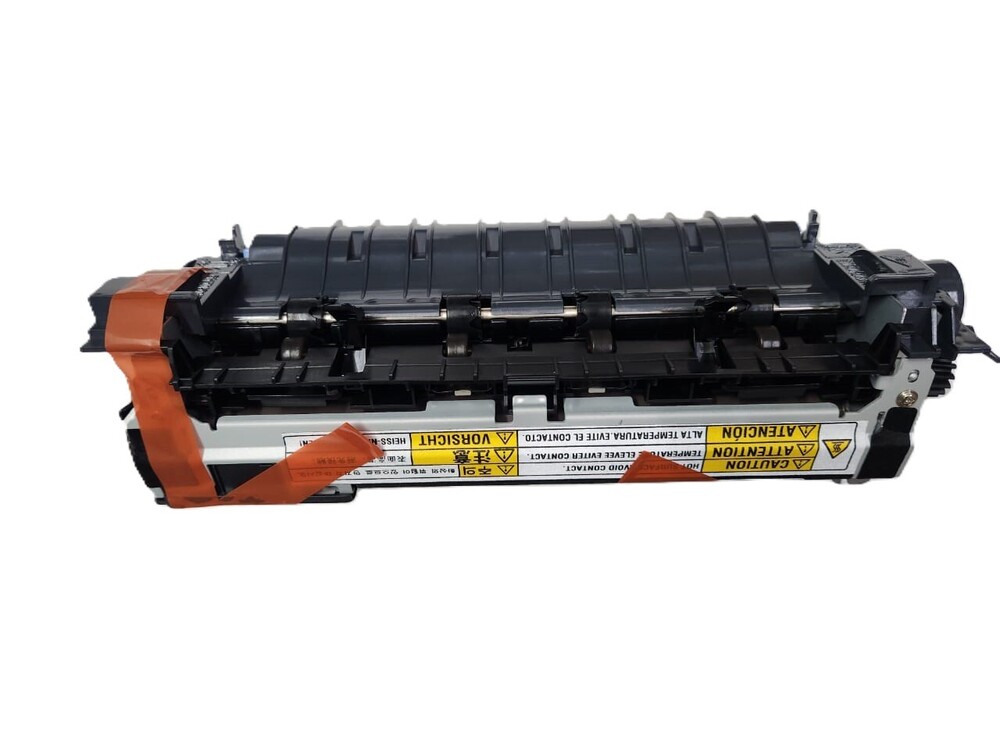
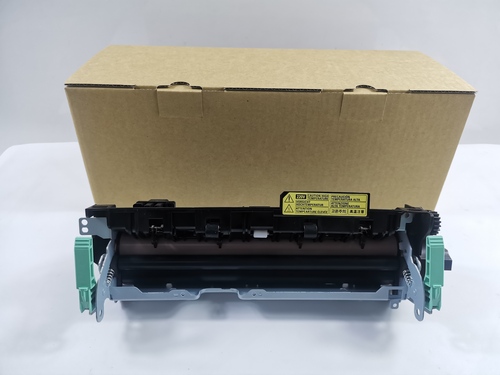
Fuser Assembly Fuser Unit HP LaserJet M604 M605 M606 Printer (RM2-6342 E6B67-67902)
For Use In
Fuser Assembly Fuser Unit HP LaserJet M604 M605 M606 Printer (RM2-6342 E6B67-67902)
Fuser Assembly For HP LaserJet M604 M605 M606 RM2-6342 E6B67-67902
RM2-6342 E6B67-67902 for HP LaserJet M604 M605 M606 Fuser Unit 220V
220V fuser RM2-6342/E6B67-67902
HP Laserjet printer series
HP LaserJet Enterprise M604dn
HP LaserJet Enterprise M604n
HP LaserJet Enterprise M605dn
HP LaserJet Enterprise M605n
HP LaserJet Enterprise M605x
HP LaserJet Enterprise M606dn
HP LaserJet Enterprise M606x
HP LaserJet Managed M605dnm
HP LaserJet Managed M605xm
Fixing Unit Assembly i Maintenance Kit i Fuser Assembly i Fuser Unit i Fuser Fixing Unit i Fuser Unit / Fixing Assembly
: LASER PRINTER PARTS
: PRINTER SPARE PARTS
: PRINTER PARTS
Engineered for Longevity and PerformanceThis fuser unit is purpose-built to withstand high duty cycles and rigorous commercial use. Thanks to its robust construction and OEM design, it ensures reliable print quality and minimizes downtime, delivering up to 200,000 pages per cycle. Users benefit from easy, tool-free replacement, reducing maintenance efforts and costs.
Perfect Compatibility with HP LaserJet Enterprise SeriesDesigned specifically for HP LaserJet Enterprise M604, M605, and M606 printers, this fuser unit ensures seamless integration and optimal performance. The unit's standard OEM dimensions and toner-fusion technology maximize output quality, making it a dependable choice for both offices and print service providers.
Secure Packaging and Hassle-Free DeliveryEach fuser unit is individually boxed with anti-static protection, safeguarding the device during transit. With a lead time of 2-5 business days, customers in India can expect swift delivery, while safe packaging ensures the unit arrives in perfect condition, ready for installation.
FAQ's of Printer Fuser Assembly Fuser Unit HP LaserJet M604 M605 M606 Printer:
Q: How do I install the Printer Fuser Assembly in my HP LaserJet M604, M605, or M606?
A: Installation is tool-free and user-replaceable. Simply power off your printer, open the fuser compartment, remove the old unit, and slide the new fuser in place. Close the compartment and power on. Refer to your printer manual for detailed, model-specific steps.
Q: What is the expected service life of this fuser assembly and how does usage affect it?
A: The fuser is designed to last for approximately 200,000 pages, though actual longevity depends on print volumes and operating conditions. Regular maintenance and adherence to suggested operating temperatures and humidity ranges help extend service life.
Q: When should I replace the fuser unit in my printer?
A: Replacement is recommended when you notice frequent paper jams, error messages about fuser failure, or diminished print quality. Consulting your printer's display or maintenance schedule can also help determine optimal replacement timing.
Q: Where should I store a spare fuser assembly before installation?
A: Store the unit in a cool, dry place away from direct sunlight, as recommended. Each assembly comes boxed with anti-static protection to safeguard against environmental damage until installation.
Q: What are the benefits of using an OEM-designed fuser assembly for my HP printer?
A: An OEM-designed fuser ensures compatibility, reliable performance, long service life, and protection of your printer warranty. It supports high-speed printing and maintains print quality across a variety of paper sizes and print volumes.
Q: What is the process for ordering and how soon can I expect delivery in India?
A: Orders can be placed through authorized distributors, suppliers, or traders. The typical lead time for delivery within India is 2-5 business days. Each unit arrives individually boxed to ensure safety during transport.



 Send Inquiry





 Send Inquiry
 Send Inquiry
 Send SMS


 English
 Spanish
 French
 German
 Italian
 Chinese (Simplified)
 Japanese
 Korean
 Arabic
 Portuguese