Product Description
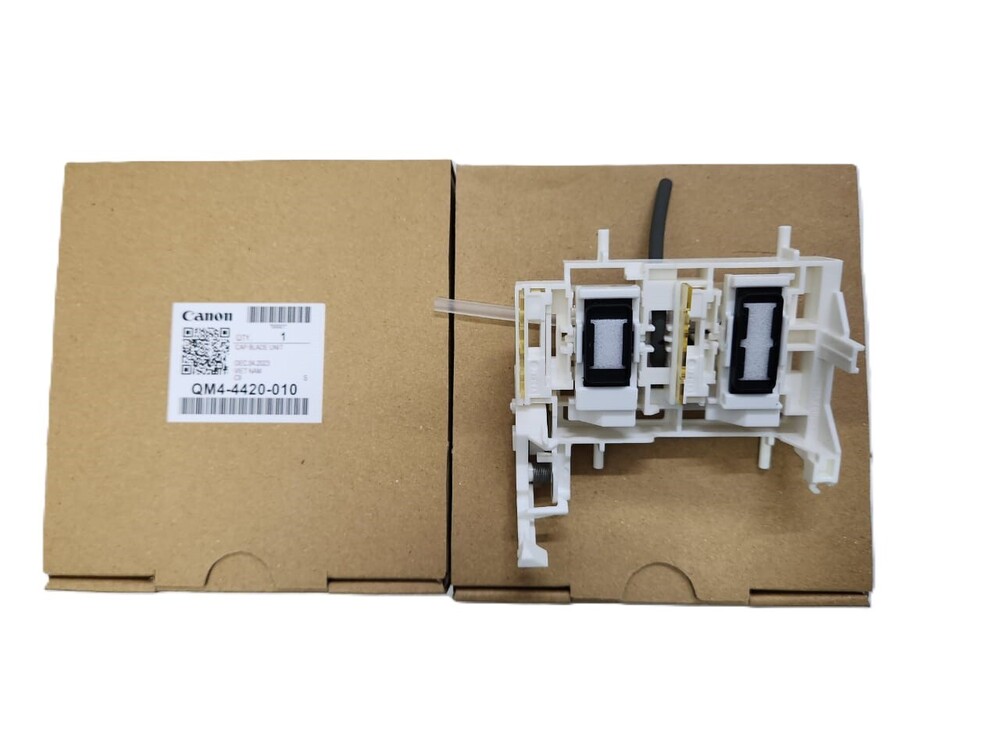
CAPPPING UNIT MAINTENANCE UNIT INK CAPPING Canon PIXMA G1000 G1010 G2000 G2002 G2012 G2010 G3000 G3010 G3012 G4000 G4010 (QM4-4420-010) NEW ORIGINAL
FOR USE IN (ORIGINAL)
CAPPPING UNIT MAINTENANCE UNIT INK CAPPING Canon PIXMA G1000 G1010 G2000 G2002 G2012 G2010 G3000 G3010 G3012 G4000 G4010 (QM4-4420-010) NEW ORIGINAL
Compatible Model i Canon PIXMA G1000 i G1010 i G2000 i G2002 i G2012 i G2010 i G3000 i G3010 i G3012 i G4000 i G4010
Canon PIXMA G 1000 i G 1010
Canon PIXMA G2000 Printer
Canon PIXMA G2002 Printer
Canon PIXMA G2010
Canon PIXMA G2012
Canon PIXMA G3000 Printer
Canon PIXMA G4000 Printer
Canon PIXMA G3010 Printer
Canon PIXMA G4010 Printer
Canon Pixma G2411 / G3411
Cappping Unit / Maintenance Unit For Canon Pixma G2000 / G2010 / G3010 (QM4-4420-010) New Original
Cap Unit / Maintenance Unit
For Canon Pixma G2000 /
G2010 / G3010 (QM4-4420-
010) New Original
: Maintenance Box Set / Maintenance / Cap Blade Unit/ INK CAPPING/ MAINTENANCE/ CAPPING ASSY
: INKJET PRINTER PARTS
High-Quality Material and ConstructionCrafted from robust plastic and fitted with a reliable rubber gasket, this capping unit offers high durability and consistent performance. Its OEM-standard design ensures a perfect fit and enduring protection for your Canon PIXMA G1000 printhead. The material selection is aimed at preventing ink drying, maintaining the longevity of your printer.
Simple, Tool-Free InstallationNo special tools or expertise are needed for installation-simply follow the manual process to replace the capping unit. Each unit comes individually packed in a polybag for easy handling and storage. With a silent operation and standard size, it's optimized for user convenience in home or office settings.
Maintenance and Replacement GuidelinesTo ensure optimal function and print quality, it is recommended to replace the capping unit every 6-12 months, or as indicated by printhead performance. Always store replacements in a cool, dry place, away from direct sunlight, to preserve material integrity. Quick lead times of 2-4 days guarantee timely upkeep of your Canon G Series printers.
FAQ's of CAPPPING UNIT MAINTENANCE UNIT INK CAPPING Canon PIXMA G1000:
Q: How do I install the CAPPPING UNIT for Canon PIXMA G1000?
A: Installation is straightforward and does not require any tools. Simply remove the old capping unit, align the new one in place, and press it gently into position following your printer's manual. The process is manual and designed for ease of use by anyone.
Q: What is the main benefit of using this capping unit in my inkjet printer?
A: The primary advantage is its ability to seal the printhead tightly, preventing ink from drying out and ensuring consistent print quality. This extends the lifespan of your printer and reduces maintenance issues related to dried ink.
Q: When should I replace the capping unit on my Canon PIXMA G1000?
A: It is recommended to replace the capping unit every 6 to 12 months, or sooner if you notice issues such as ink drying or inconsistent print output. Regular replacement helps maintain optimal printer performance.
Q: Where should I store unused capping units?
A: Store spare capping units in a cool, dry place, away from direct sunlight. Proper storage maintains the condition of the plastic and rubber gasket, ensuring the unit remains effective when installed.
Q: What printers is this capping unit compatible with?
A: This capping unit is specifically designed for Canon G Series PIXMA printers, with a perfect fit for models like the Canon PIXMA G1000. Always verify compatibility with your printer model before purchase.
Q: How does the capping unit prevent ink from drying?
A: The unit forms a tight seal over the printhead using a precise rubber gasket. This prevents air exposure and evaporation, thereby keeping the ink in optimal condition for consistent printing.



 Send Inquiry





 Send Inquiry
 Send Inquiry
 Send SMS


 English
 Spanish
 French
 German
 Italian
 Chinese (Simplified)
 Japanese
 Korean
 Arabic
 Portuguese