Product Description
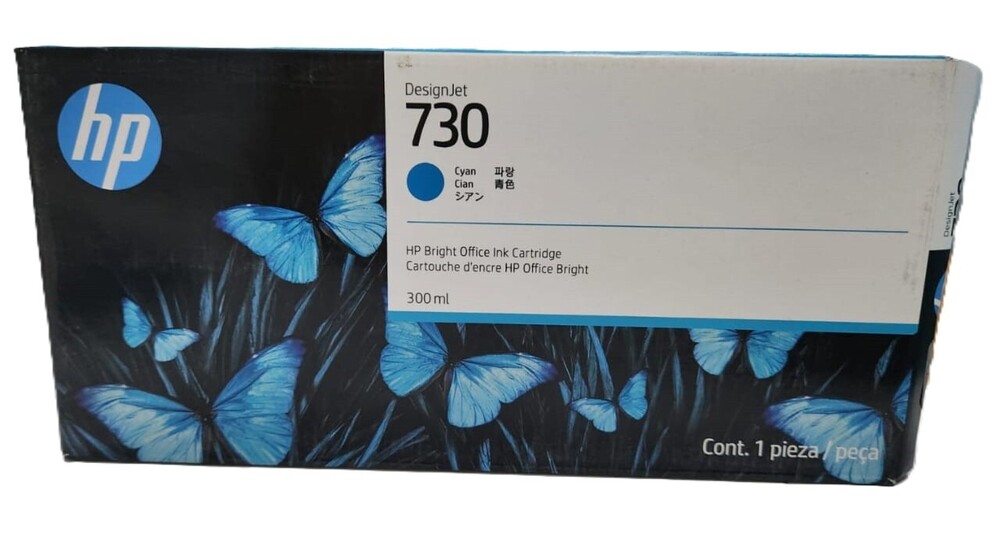
HP 730 300-ml Cyan Ink Cartridge (P2V68A)
HP DesignJet T1700 T2600 T1600 (ORIGINAL)
FOR USE IN (ORIGINAL)
HP 730 300-ml Cyan Ink Cartridge (P2V68A)
HP DesignJet T1700 T2600 T1600 (ORIGINAL)
HP DesignJet T2600; HP DesignJet T1600;HP DesignJet T1700
P2V68A HP 730 300-ml Cyan DesignJet Ink Cartridge
HP 730 300-ml Cyan DesignJet Ink Cartridge
High Capacity for Demanding Print JobsDesigned to handle large-scale printing projects, the HP 730 Cyan Ink Cartridge offers a substantial 300 ml capacity. This high-yield feature means fewer replacements and more uninterrupted workflow, perfect for businesses and professionals using HP DesignJet Z Series large format printers.
Precision Color and Fade ResistanceThe pigment-based ink in the HP 730 Cyan Cartridge delivers consistently accurate, vibrant colors. Printouts retain their quality and color fidelity over time, thanks to its fade-resistant properties-making it an excellent choice for graphics, technical drawings, and photo prints.
Reliable Performance and Easy InstallationThis original HP cartridge ensures compatibility and effortless installation in supported DesignJet models. Storage and handling are straightforward: keep the cartridge in a cool, dry place to maintain peak performance over its 18-month shelf life, ensuring readiness whenever you need it.
FAQ's of HP 730 300-ml Cyan Ink Cartridge:
Q: How do I install the HP 730 300-ml Cyan Ink Cartridge in my DesignJet printer?
A: To install the HP 730 Cyan Ink Cartridge, open the ink compartment of your HP DesignJet Z series printer, remove any empty cartridge, and insert the new cartridge until it clicks into place. Follow the printer's display prompts to ensure secure installation.
Q: What HP printer models are compatible with this cyan ink cartridge?
A: This HP 730 Cyan cartridge is designed for use with HP DesignJet Z6810, Z6610, Z6810dr, and Z6610dr Series large format printers, ensuring perfect compatibility and performance.
Q: Where should I store the HP 730 Cyan Ink Cartridge when not in use?
A: Store the cartridge in a cool, dry environment with temperatures between -40C and 60C for storage and 5C to 35C for optimal operation. Avoid direct sunlight and extreme humidity to maximize its shelf life.
Q: What is the shelf life of the HP 730 Cyan Ink Cartridge?
A: This ink cartridge has a shelf life of 18 months from the date of manufacture, allowing you to stock up without concern for rapidly expiring supplies.
Q: What are the main benefits of using the HP 730 300-ml high-yield ink cartridge?
A: The HP 730 Cyan cartridge provides high-capacity printing, consistent and fade-resistant colors, easy installation, and genuine compatibility. It's ideal for demanding print environments requiring professional quality and reliability.
Q: How should I handle the cartridge to get the best printing results?
A: Always shake the cartridge gently before installation, handle only in clean, dry hands, and avoid touching the ink port. Follow proper printer guidelines for storage and replacement to ensure optimal color quality and performance.



 Send Inquiry





 Send Inquiry
 Send Inquiry
 Send SMS


 English
 Spanish
 French
 German
 Italian
 Chinese (Simplified)
 Japanese
 Korean
 Arabic
 Portuguese