Product Description
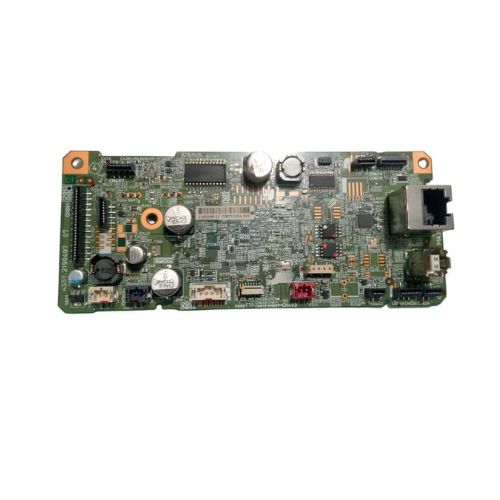
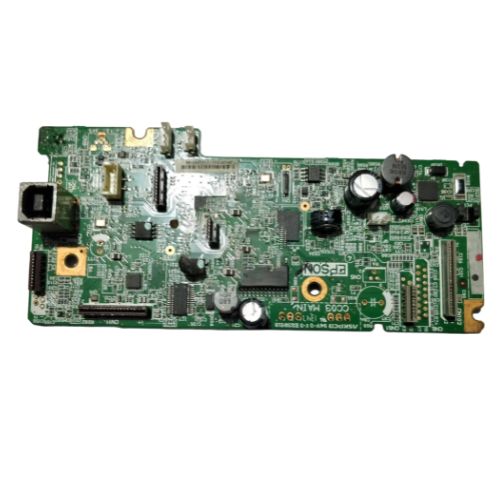
The Formatter Board / Logic Card for Epson EcoTank Monochrome M2170 is a vital component that ensures seamless communication between the printers software and hardware. If your printer is experiencing startup issues, USB port errors, or irregular behavior, this replacement board is a cost-effective and reliable solution. This is a Refurbished Original board, pulled from working units and thoroughly tested to ensure optimal performance. Ideal for restoring your Epson M2170 to like-new condition.
Compatible Epson Model:
- Epson Eco Tank Monochrome M2170 All-in-One Wi-Fi Duplex Printer
________________________________________________
Part Numbers :
- (2195569 / 2190497/2203388 / 2214029/2214131/2214028)
________________________________________________
Also Known As:
-
- Formatter Card / Logic Board / Main PCB Board / Motherboard / MPCA / MLC / Main USB Board
________________________________________________
Product Condition:
-
Refurbished Original / Pulled Original / Working Original
-
Professionally cleaned, tested, and fully functional
-
14 Days Replacement Warranty
Reliable Performance for Efficient PrintingThe Epson EcoTank Monochrome M2170 Logic Card is engineered to deliver consistent and stable printer performance. Its good-quality build guarantees reliable data processing and communication with other printer components, helping to maximize your device's productivity.
Easy Installation and MaintenanceDesigned for straightforward installation, this formatter board minimizes printer downtime. Users can easily replace or upgrade their printer's logic card, ensuring hassle-free maintenance and improved printer lifespan. Always store the unit in a dry place to preserve its quality.
FAQ's of Epson EcoTank Monochrome M2170 Logic Card / Formatter Board:
Q: How do I install the Epson EcoTank Monochrome M2170 Logic Card into my printer?
A: To install the logic card, make sure your printer is switched off and unplugged. Open the back cover, carefully remove the old board, and plug in the new formatter board as per the manual instructions. Reassemble the printer before powering it on.
Q: What is the main benefit of using this high-quality formatter board?
A: The primary benefit is enhanced reliability and efficient communication within your printer, resulting in smoother operation and more dependable printing results.
Q: When should I replace the formatter board in my M2170 printer?
A: You should consider replacing the formatter board if your printer displays errors related to processing, fails to boot, or experiences connectivity issues that are not resolved by standard troubleshooting.
Q: Where can I purchase this logic card in India?
A: You can buy the Epson EcoTank M2170 Logic Card from authorized distributors, suppliers, or traders throughout India who specialize in printer components.
Q: What is the recommended way to store the logic card when not in use?
A: Store the logic card in a dry place to prevent damage from moisture and ensure its longevity and consistent performance.
Q: How does the formatter board contribute to the printing process?
A: The formatter board interprets print commands from your computer, processes the data, and communicates with the printer's hardware to produce precise and accurate prints.



 Send Inquiry





 Send Inquiry
 Send Inquiry
 Send SMS


 English
 Spanish
 French
 German
 Italian
 Chinese (Simplified)
 Japanese
 Korean
 Arabic
 Portuguese