Product Description
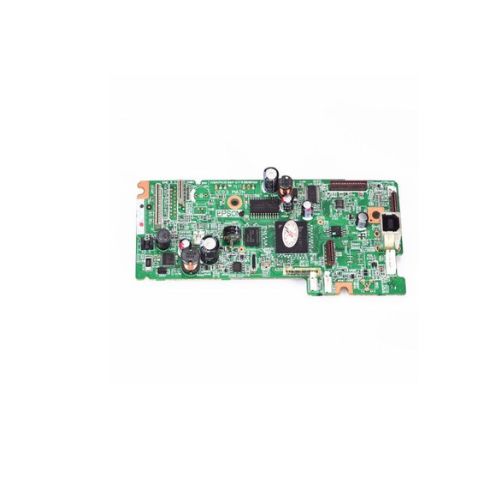
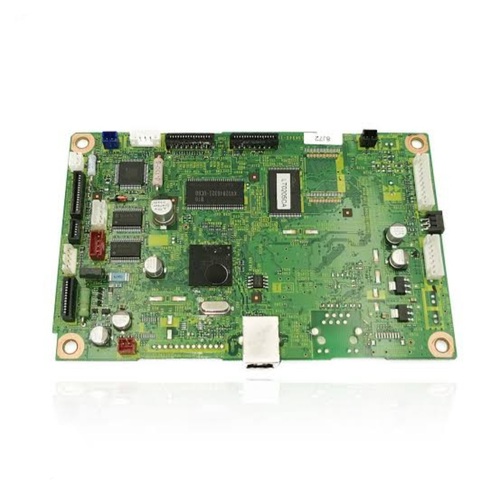
Restore or upgrade your Epson L555 Ink Tank All-in-One Printer with this high-quality Formatter Board / Logic Card. This internal motherboard component controls communication between your printers software and hardware, ensuring stable and efficient performance.It is compatible with multiple part numbers, making it ideal for printer repair professionals and service centers looking for dependable replacements.
Compatible Epson Model:
________________________________________________
Part Numbers :
- (2172090 / 2163395 /2155278 / 2181633 / 2155501)
________________________________________________
Also Known As:
- Formatter Card / Logic Board /Main PCB Board / Motherboard / MPCA / MLC / USB Board
________________________________________________
Product Condition:
-
Refurbished Original / Pulled Original / Working Original
-
Professionally cleaned, tested, and fully functional
-
14 Days Replacement Warranty
High-Quality Replacement for Epson PrintersThe Epson L555 Logic Card/Formatter Board ensures your printer runs smoothly by serving as the main interface for data processing within your device. Crafted from materials that guarantee reliability, this component is an excellent solution for those needing to restore or enhance their Epson printer's performance. Its sturdy, solid design and vibrant green color set it apart in quality and appearance.
Reliable Distribution Network in IndiaAvailable through a network of trusted distributors, suppliers, and traders across India, the Epson L555 Logic Card offers hassle-free procurement for businesses and individuals. This widespread availability ensures that servicing or upgrading your printer is a straightforward process, backed by dependable support and swift delivery.
FAQ's of Epson L555 Logic Card / Formatter Board:
Q: How do I install the Epson L555 Logic Card in my printer?
A: Installation involves carefully opening your printer and replacing the existing logic card with the Epson L555 Logic Card. Ensure your printer is powered off, and follow the manufacturer's service manual for step-by-step instructions. If you are unsure, it is advisable to seek professional assistance from a technician.
Q: What is the function of the Formatter Board in an Epson printer?
A: The Formatter Board, or Logic Card, is responsible for processing all data sent to the printer and coordinating its internal operations. It ensures that print commands are executed correctly for optimal output and printer functionality.
Q: When should I consider replacing my printer's Logic Card?
A: You should consider replacing the Logic Card when you notice data processing errors, frequent communication failures, or when your printer fails to start despite other components functioning correctly.
Q: Where can I purchase the Epson L555 Logic Card in India?
A: These logic cards are widely distributed through authorized suppliers, distributors, and traders across India. You can find them through leading online electronic parts marketplaces or local office equipment dealers.
Q: What is the recommended storage guideline for the Epson L555 Logic Card?
A: It is best to store the logic card in a dry place to prevent moisture damage that could affect its performance. Proper storage helps maintain the longevity and integrity of the component.
Q: How do I benefit from using a genuine Epson L555 Logic Card?
A: Using a genuine logic card ensures high compatibility and stable performance for your printer, minimizing technical issues and maximizing device lifespan.



 Send Inquiry





 Send Inquiry
 Send Inquiry
 Send SMS


 English
 Spanish
 French
 German
 Italian
 Chinese (Simplified)
 Japanese
 Korean
 Arabic
 Portuguese