Product Description
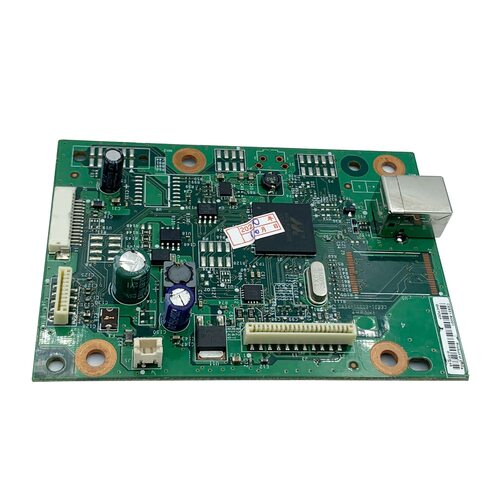
Formatter Board / Logic Board / MainBoard / Main PCB Assembly
For Use With
- HP LaserJet M 1130
- HP LaserJet M 1132
- HP LaserJet M 1136
-
For Use With
- HP LaserJet M 1130
- HP LaserJet M 1132
- HP Las
- HP LaserJet M 1
Effortless Replacement for Enhanced PerformanceReplacing the existing logic card in your HP Laserjet M1136 printer is straightforward with this compatible unit. The logic card restores full operational capacity, resolving error messages and print failures. Designed for precise fitment, it minimizes downtime and ensures your printer continues to deliver clear, professional prints. Rely on this part for dependable results and extended printer life.
Local Availability Throughout AngolaThis HP Laserjet M1136 Printer Logic Card is distributed by authorized suppliers and traders across Angola. Whether you're a business, technician, or end-user, you can conveniently acquire genuine parts locally. Fast delivery and after-sale support facilitate a quick restoration process, keeping your print operations running smoothly.
FAQ's of HP Laserjet M1136 Printer Logic Card:
Q: How do I install the HP Laserjet M1136 Printer Logic Card in my printer?
A: To install the logic card, turn off your HP Laserjet M1136 printer and disconnect it from power. Open the appropriate panel, carefully remove the faulty logic card, and replace it with the new one. Ensure all connectors are securely attached, then reassemble the printer and restart it. Refer to your printer manual or consult a professional technician for detailed steps.
Q: What benefits does using an original HP Laserjet M1136 Printer Logic Card provide?
A: Using an original logic card ensures optimal compatibility, reliability, and print quality. It reduces the likelihood of malfunctions, extends the printer's life, and maintains high performance, which is especially important for frequent or professional use.
Q: When should I replace the logic card in my HP Laserjet M1136 printer?
A: Replace the logic card if your printer exhibits persistent operational errors, won't start properly, or troubleshooting steps indicate a hardware fault. Doing so promptly restores normal function and prevents further issues.
Q: Where can I purchase the HP Laserjet M1136 Printer Logic Card in Angola?
A: You can buy this logic card from authorized distributors, suppliers, and traders throughout Angola. It is advisable to seek reputable sources to ensure you receive a genuine and warranted product.
Q: What is the process of identifying a faulty logic card in the HP Laserjet M1136?
A: Common indicators include frequent system crashes, error codes related to hardware, and complete power failure. A diagnostic by a certified technician can confirm if the logic card is the root cause, after which a replacement should be considered.
Q: How does the logic card influence printer performance and output quality?
A: The logic card manages the printer's processing and communication functions. A functioning card ensures smooth operations, quick print jobs, and consistent output quality. Faulty cards often result in errors and poor print results.



 Send Inquiry






 Send Inquiry
 Send Inquiry
 Send SMS


 English
 Spanish
 French
 German
 Italian
 Chinese (Simplified)
 Japanese
 Korean
 Arabic
 Portuguese