Product Description
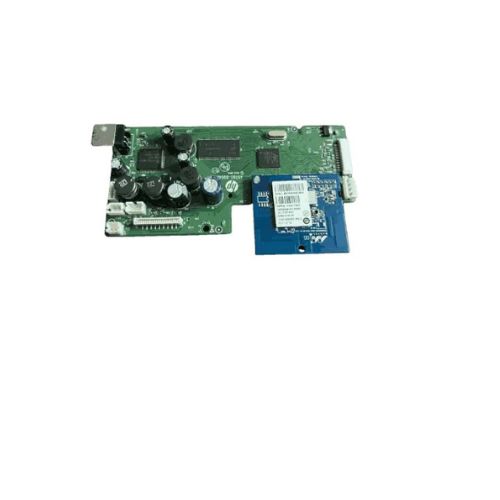
Replace your faulty motherboard with this Formatter Board / Logic Card for HP DeskJet Ink Advantage 3545. This Main PCB Board is responsible for controlling the core printer functions including USB communication and print processing. Compatible with part number A9T80-80042, this board is a Refurbished Original, carefully pulled from working machines and tested for full functionality. A reliable solution for restoring your printers performance.
Compatible HP Model:
________________________________________________
Part Numbers :
________________________________________________
Also Known As:
- Formatter Card / Logic Board / Main PCB Board /Motherboard / MPCA / MLC / USB Board / Main USB Board
________________________________________________
Product Condition:
-
Refurbished Original / Pulled Original / Working Original
-
Professionally cleaned, tested, and fully functional
-
14 Days Replacement Warranty
Essential Replacement for HP DeskJet 3545This logic card or formatter board acts as the central control unit for your HP DeskJet Ink Advantage 3545 printer, ensuring smooth data processing and communication between hardware components. Using a genuine board guarantees reliable printouts and reduces potential issues.
Reliable Performance and CompatibilityBuilt to work specifically with HP DeskJet 3545 printers, this green logic card offers seamless integration and easy installation. Its standardized size and electric power compatibility make it a straightforward replacement that brings your device back to peak efficiency.
Proper Storage for Lasting FunctionalityTo maintain the board's integrity and performance, store it in a cool, dry place. Protecting the card from moisture and extreme temperatures will extend its lifespan and prevent electrical faults, ensuring you receive the most value from your investment.
FAQ's of HP DeskJet Ink Advantage 3545 Logic Card / Formatter Board:
Q: How do I install the HP DeskJet Ink Advantage 3545 Logic Card in my printer?
A: To install the logic card, first turn off and unplug your HP DeskJet 3545 printer. Open the printer casing as per the manufacturer's guide, carefully remove the old formatter board, and securely connect the new card. Reassemble the printer and turn on the power to test functionality.
Q: What are the storage instructions for this logic card?
A: The HP DeskJet 3545 Logic Card should be kept in a cool and dry environment to prevent moisture or heat damage, which helps maintain its electronic integrity and ensures optimum performance when installed.
Q: When should I consider replacing my printer's logic card?
A: Replace your printer's logic card when you experience consistent errors, connectivity problems, or when the printer fails to process print instructions despite functional ink and paper supplies.
Q: Where can I purchase this logic card in India?
A: You can obtain the HP DeskJet 3545 Logic Card from authorized distributors, suppliers, and traders across India that specialize in HP printer components.
Q: What is the main benefit of using a genuine HP formatter board?
A: Installing a genuine HP formatter board ensures optimal compatibility, reduces the likelihood of printer errors, and extends the overall lifespan of your HP DeskJet 3545 printer.
Q: How does the formatter board influence the printer's operation?
A: The formatter board manages the flow of data between your computer and the printer hardware, processing print commands and controlling the mechanical functions necessary for accurate printing.



 Send Inquiry






 Send Inquiry
 Send Inquiry
 Send SMS


 English
 Spanish
 French
 German
 Italian
 Chinese (Simplified)
 Japanese
 Korean
 Arabic
 Portuguese