Product Description
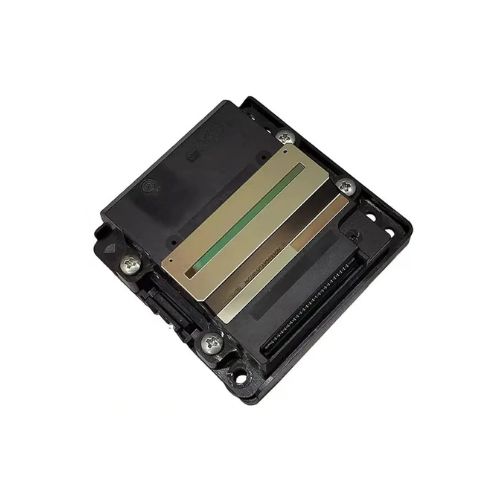
Print Head For Epson
L6270/ L6271/ L6276/ L6191/ ET3750/ ET-3850/ ET-3850U/ L14150/ L14155/ L14158/ ET15000 Printhead (FA35011)
EPSON ET3750/ L6170/L6071/L6178 ET-3850 ET-3850U L6270 L6271 L6276 L6271
Print Head for EPSON L3550/ L6070/ L6170/ L6160/ L6190/ L6270/ L6290/ L6460/ L6490 / L11050/ L14150 / ET-3700/ 3750/ 5150/ 5170 / ET-14100/ 15000 (FA35011)
Superior Print QualityEngineered with precision for Epson printers, this print head produces high-quality and sharp black prints suitable for both home and office tasks. Its solid construction ensures durability, delivering consistent output and extended lifespan.
Compatible With Multiple Epson ModelsEnjoy a broad range of compatibility, as this print head fits seamlessly with various Epson models, including the L6270, ET3750, and L14150 series. This versatility simplifies upgrades and replacements for users with multiple printers.
Easy Installation and MaintenanceThe manual design allows for straightforward installation, making it user-friendly for anyone familiar with basic printer maintenance. Keep your print head in a dry place to ensure longevity and continuous peak performance.
FAQ's of Print Head For Epson L6270/ L6271/ L6276/ L6191/ ET3750/ ET-3850/ ET-3850U/ L14150/ L14155/ L14158:
Q: How do I install this print head in my Epson printer?
A: To install the print head, turn off your Epson printer, open the printer cover, and gently replace the existing print head with the new one. Ensure it is properly aligned, then close the cover and power on the machine. Consult your printer's manual for model-specific steps.
Q: What Epson printer models are compatible with this print head?
A: This print head is compatible with Epson L6270, L6271, L6276, L6191, ET3750, ET-3850, ET-3850U, L14150, L14155, and L14158 models.
Q: When should I consider replacing my printer's print head?
A: Replace the print head if you notice streaky, faded, or incomplete prints that regular cleaning cycles cannot resolve, or when the printer displays a replacement error specific to the print head.
Q: Where should I store the print head when not in use?
A: Keep the print head in a dry place, away from direct sunlight and excessive dust, to prevent moisture damage and preserve its functionality.
Q: What are the main benefits of using this print head?
A: The main benefits include high-quality black prints, reliable performance, compatibility with numerous Epson models, and improved durability thanks to its solid construction.
Q: How should I use this product for optimal results?
A: For optimal printing results, install the print head according to your printer's instructions and use genuine Epson ink. Always run printer maintenance cycles regularly and store the print head properly when not in use.
Q: What processes can help extend the lifespan of this print head?
A: To extend the lifespan, perform routine cleaning using your printer's maintenance settings, avoid using low-quality ink, and store the print head in a dry, dust-free environment when not installed.



 Send Inquiry






 Send Inquiry
 Send Inquiry
 Send SMS


 English
 Spanish
 French
 German
 Italian
 Chinese (Simplified)
 Japanese
 Korean
 Arabic
 Portuguese