Product Description
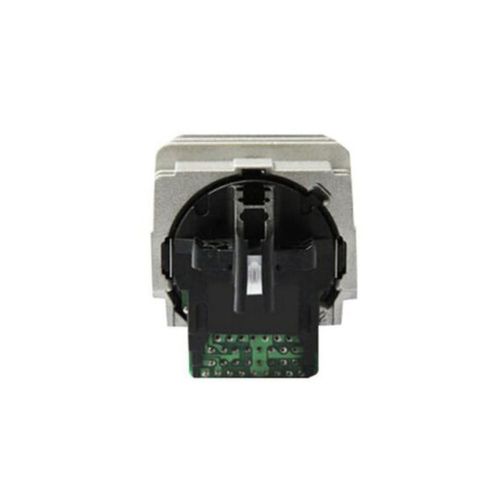
Print Head For Epson LQ-50 / LQ-300 / LQ-300+ / LQ-300+II Dot Matrix Printer Head (F045000 )
Print Head F045000 For Epson LQ-50 LQ-300 LQ-300+ LQ-300+II Printer
Compatible Model- Epson LQ50 / LQ300 / LQ300+ /LQ300+II
Epson LQ-50 Printer - Epson LQ-300 Printer - Epson LQ- 300+ Printer - Epson LQ-300+ Printer
Print Head F045000 For Epson DMP Dot Matrix Printer
For Use With
Epson LQ-50 Printer
Epson LQ-300 Printer
Epson LQ-300+ Printer
Epson LQ-300+II Printer
Universal Compatibility and PerformanceThis print head is engineered for use in Epson LQ-50, LQ-300, LQ-300+, and LQ-300+II dot matrix printers. Its robust construction ensures seamless integration and reliable performance, making it an excellent replacement for worn-out or malfunctioning print heads.
Easy Installation and UsageDesigned for effortless installation, this print head enables quick maintenance with minimal downtime. Users can easily replace old print heads without the need for specialized tools or technical expertise, ensuring your Epson printer is up and running swiftly.
Storage and Longevity TipsTo prolong the lifespan and maintain optimal functionality, store the print head in a cool, dry environment. Proper storage ensures that the sensitive electrical components remain protected from moisture and dust, safeguarding print quality over time.
FAQ's of Print Head For Epson LQ-50 / LQ-300 / LQ-300+ / LQ-300+II Dot Matrix Printer Head:
Q: How do I install the Print Head for Epson dot matrix printers?
A: To install the print head, ensure your printer is powered off and unplugged. Open the printer cover, gently remove the old print head, and align the new one securely in its place. Make sure it fits snugly before connecting any cables and powering on the device.
Q: What printer models is this print head compatible with?
A: This print head is specifically engineered for use with Epson LQ-50, LQ-300, LQ-300+, and LQ-300+II dot matrix printers, ensuring a seamless fit and optimum performance in each supported model.
Q: When should I replace my Epson printer's print head?
A: Replace the print head when you notice a significant decline in print quality, such as missing lines, unclear text, or uneven printing. Regular maintenance checks can help detect issues early and prevent further damage.
Q: Where can I purchase this compatible Epson print head in India?
A: You can obtain this print head through authorized distributors, suppliers, and traders across India. Check with reputable office supply stores or e-commerce platforms for availability.
Q: What are the advantages of using this compatible print head?
A: This print head offers high durability, consistent print quality, and simple installation. It restores your printer's performance and helps maintain productivity without costly repairs or replacements.
Q: How should the print head be stored when not in use?
A: Store the print head in a cool, dry place, away from direct sunlight or moisture. This prevents damage to its sensitive components and extends its longevity.
Q: What is the process to ensure optimal performance after installation?
A: After installation, run a printer head alignment and cleaning cycle via your printer's maintenance menu. This ensures the print head is correctly aligned and delivers clear, consistent prints.



 Send Inquiry





 Send Inquiry
 Send Inquiry
 Send SMS


 English
 Spanish
 French
 German
 Italian
 Chinese (Simplified)
 Japanese
 Korean
 Arabic
 Portuguese