Product Description
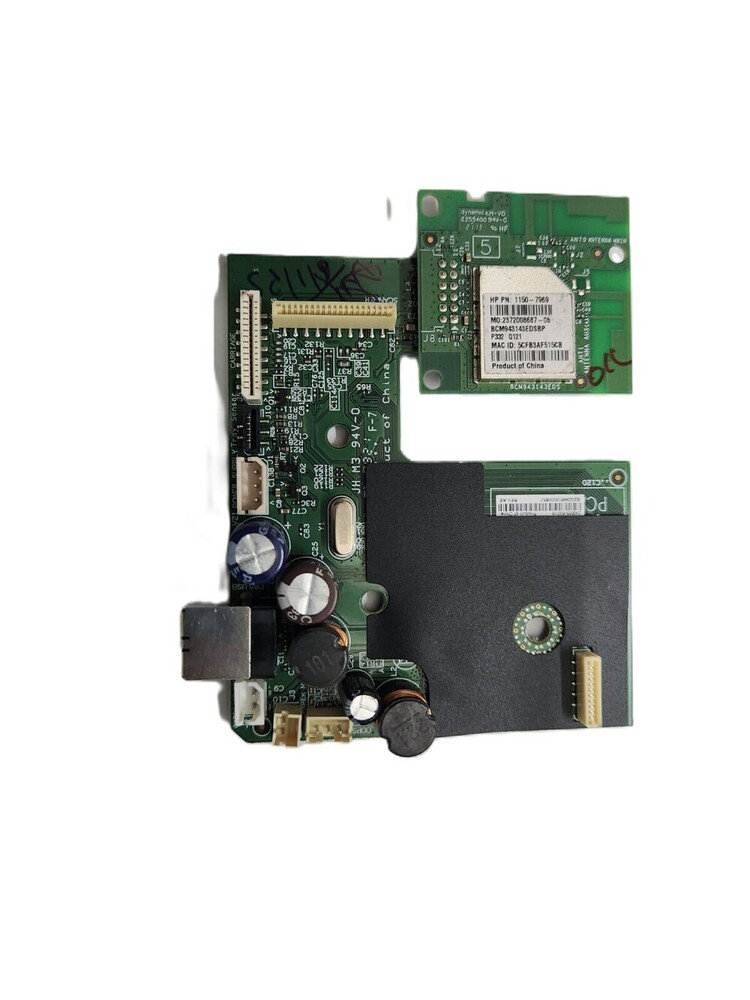
Logic Card Formatter Board HP Ink Tank Wireless 419 416 415 410 Printer (Z4B55-60018 / Z4B55-80018)
For Use In (REFURBISHED)
Logic Card Formatter Board HP Ink Tank Wireless 419 416 415 410 Printer (Z4B55-60018 / Z4B55-80018)
HP INK TANK 410 / 415 / 416 / 419
Part Number - Z4B55-60018 / Z4B55-80018
Compatible Model - HP Ink Tank Wireless 410 / 415 / 416/419
HP Ink Tank 410 - 415 - 416 419
Formatter Card / Logic Board / Main PCB Board /
Motherboard / MPCA / MLC / USB Board / Main USB Board
: Logic Card /Formatter Card Formatter Board / Formatter PCA Assy / Logic Board / Usb Board / Usb Card /Main Board / Main PCB Assembly / Mother Board/ Printer Card / Printer Board
: INKJET PRINTER PARTS
: Printer Spare Parts
: Printer Parts
Central Control for Ink Tank PrintersThis formatter board acts as the brain of your HP Ink Tank Wireless 419, 416, 415, or 410. By seamlessly managing operations and enabling wireless connectivity, it ensures efficient, stable, and consistent printing performance, making it an ideal replacement for malfunctioning logic boards.
OEM Quality and Easy InstallationEach board is carefully tested for quality assurance and meets original equipment manufacturer (OEM) standards. With a plug-and-play design, it is tailored for easy replacement by professionals, ensuring your printer is back up and running with minimal hassle.
FAQ's of Printer Logic Card Formatter Board HP Ink Tank Wireless 419 416 415 410 :
Q: How does the formatter board benefit my HP Ink Tank Wireless printer?
A: The formatter board restores the main control of your HP Ink Tank Wireless 419, 416, 415, or 410 printer, ensuring stable operations, managing wireless and USB connectivity, and maintaining overall print performance.
Q: What models is this formatter board compatible with?
A: This board is specifically designed for HP Ink Tank Wireless 419, 416, 415, and 410 models. It is not compatible with other HP or non-HP printers.
Q: When should I replace the printer formatter board?
A: Replace the formatter board if your printer exhibits recurring errors, fails to connect wirelessly, or experiences logic/control failures that are not resolved by other troubleshooting steps.
Q: Where should I store the formatter board before installation?
A: Store the formatter board in antistatic packaging in a cool, dry place. Avoid exposure to humidity to retain its reliability and protect sensitive electronic components.
Q: What is the installation process for this board?
A: Professional installation is strongly recommended. Ensure anti-static precautions are taken during handling and follow your printer model's disassembly steps for safe and accurate replacement.
Q: How do I know the formatter board is functioning properly after installation?
A: Upon installation, your printer should power up normally, recognize wireless and USB connections, and resume standard printing speed and functions without error messages.
Q: What are the usage guidelines for maintaining board performance?
A: Handle the board only with anti-static protection and avoid contact with moisture. Ensure your printer's internal power supply (12V/24V DC as per model) is functioning to support the formatter board for long-lasting reliability.



 Send Inquiry






 Send Inquiry
 Send Inquiry
 Send SMS


 English
 Spanish
 French
 German
 Italian
 Chinese (Simplified)
 Japanese
 Korean
 Arabic
 Portuguese